Email SSE Streams: Push Inbound Mail to AI Agents

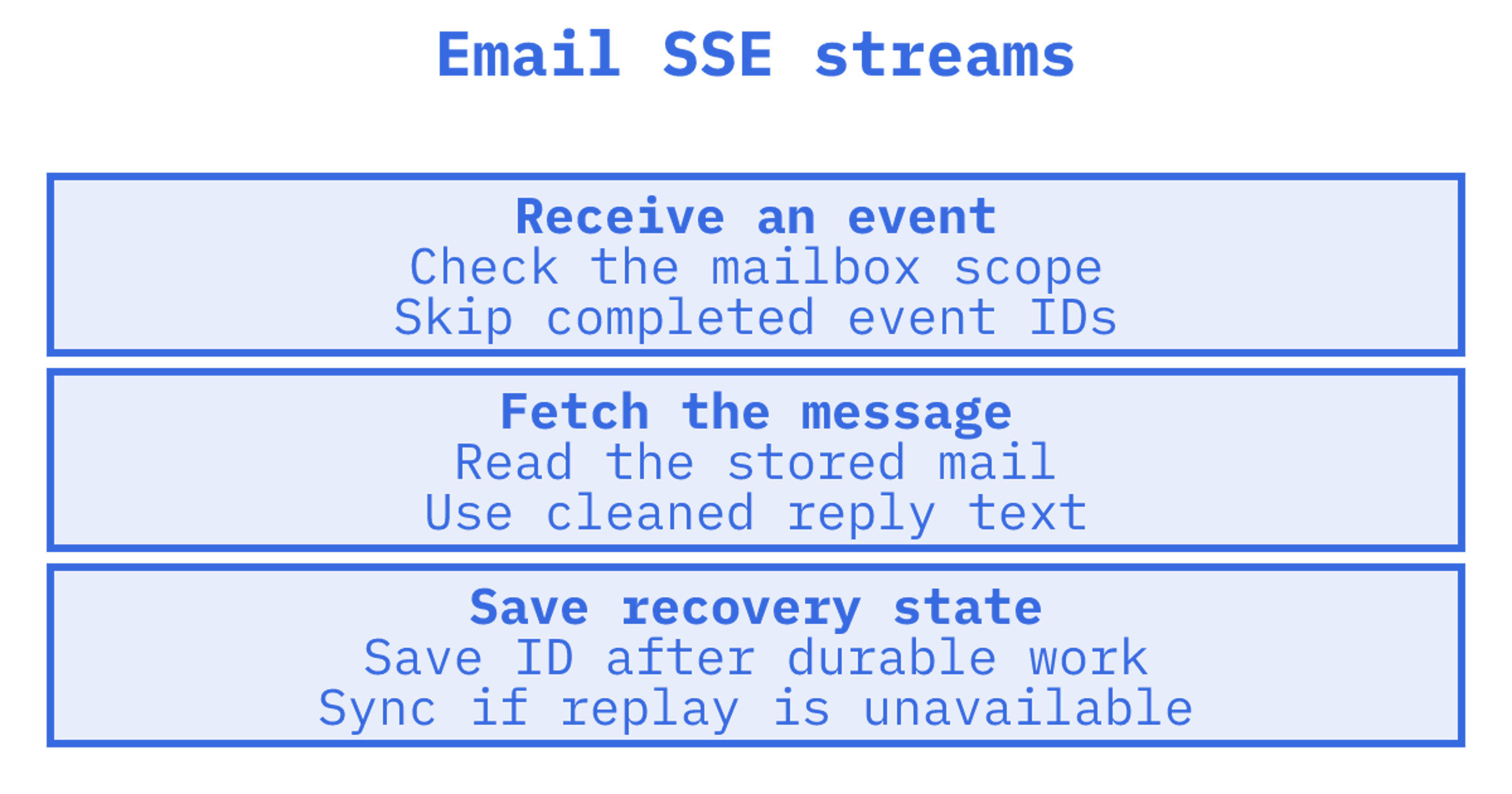
An email SSE stream is a long-lived HTTP connection over which a mail system pushes small events (new message, flag change, delivery update) to your agent as they happen, so the agent stops polling the inbox. Use the event to decide what to read, then fetch the message from the mailbox API. Store a durable cursor so you can request replay after a disconnect. Sync the mailbox when the replay window has passed. Qubrics provides persistent agent mailboxes within the team’s limits. The Mailbox API reads stored mail and can stream received-message notifications.
This guide explains how the pieces fit, what to put in an event, how to reconnect without losing mail, how to keep tenants apart, and when a webhook is the better tool.
TL;DR
- SSE (Server-Sent Events) is one-way server-to-client streaming over HTTP. It suits email because mail notifications only ever flow from the server to your agent.
- Use a small event with IDs and a state token when you design a feed. The agent then reads the cleaned message from the mailbox API.
- Resuming can replay an event. Store a cursor, deduplicate on event ID and use the mailbox to recover current state.
- Check proxy buffering and idle timeouts when a stream connects and stops delivering events.
- Use SSE for agents that hold a connection open and webhooks for serverless or stateless receivers. Many teams run both.
Table of Contents
What an email SSE stream is
Server-Sent Events is a web standard in which a client opens an ordinary HTTP request and the server keeps the response open, writing events to it as text. The browser-side API is called EventSource, and most server languages can read the same format with an HTTP client. There is no upgrade handshake and no second protocol, which is why it passes through most load balancers and corporate networks more easily than WebSockets.
Applied to email, the stream is a feed of changes to a mailbox. The idea is not new. The JMAP standard (the JSON-based successor to IMAP) defines an event source resource so that clients holding a connection open receive push notifications directly from the server, and it describes the alternative of the server POSTing each notification to a registered URL, which is the webhook model. SSE and webhooks are two delivery routes for the same notification.
For an AI agent, the value is latency and cost. A polling loop that lists the inbox every 30 seconds burns requests and tokens while nothing is happening, and still reacts up to 30 seconds late. A stream can notify the agent when mail lands, with one connection left open between events.
What should an event contain?
The most common design mistake is putting the entire message in the event. Mail is large, attachments are larger, and a stream that carries bodies is hard to resume, hard to replay and easy to overflow. A good event is small and says what changed, where and in what order:
| Field | Purpose |
|---|---|
| Event ID | Lets the client deduplicate and resume |
| Event type | For example message received, message updated, delivery status changed |
| Mailbox ID | Routes the event to the right agent or tenant |
| Message or thread ID | The handle for fetching the detail |
| State token or cursor | Where the mailbox was at this point in the feed |
The agent receives that, decides whether it cares (a rule on sender, folder or thread), and fetches only what it needs. This is where the mailbox API earns its keep. A Qubrics mailbox stores messages between runs. The Mailbox API can strip quoted history from message text, so the agent can work from the new reply without parsing the raw MIME thread. Filter messages by folder, thread, sender, subject, headers, date range, unread status and other criteria. Use the thread filter on its own. The count endpoint returns the number of matches without fetching rows, which keeps the response and model input small.
The fetch-after-notify loop
Here is the loop most email agents should run:
- Connect to the stream for one mailbox and send the last cursor you stored.
- Receive an event. Check its ID against the IDs you have already handled.
- Filter cheaply on the event type and identifiers. Ignore what the agent does not own.
- Fetch the message or thread through the mailbox API, using the cleaned text for the model.
- Act. Classify the message, draft a reply, call a tool or update a CRM.
- Commit the cursor after the work is durable.
Step 6 matters. If you save the cursor on receipt and your process crashes mid-task, that message is silently skipped. If you save it after completion, a crash causes a replay, which step 2 absorbs. A replay you can detect is far cheaper than a gap you cannot.
Qubrics sync endpoints return state tokens for typed mailbox changes, folder changes and query changes. For stream replay, reconnect with the last processed event ID. If the stream returns sync_required, call GET /mailbox/changes before reopening it. For replies, use a sending interface that accepts the standard In-Reply-To and References headers. Use the parent message ID and the chain of earlier IDs to help the recipient’s client group the conversation.
Reconnecting, resuming and duplicates
Streams drop. Laptops sleep, containers restart, load balancers recycle connections. The question is what your agent does next.
The SSE format has a built-in answer: events can carry an ID, and a reconnecting client sends the last ID it saw so the server can replay what was missed. Browsers do this automatically through EventSource. In a server-side agent you implement it yourself, which means persisting the last processed ID somewhere that survives a restart (a database row per mailbox is enough).
Then be honest about what that buys you. The Model Context Protocol's events extension proposal states that cursors support resumability and event IDs support deduplication, but exactly-once delivery is not a protocol guarantee, so applications need durable cursors and their own deduplication. Plan for three cases:
- Duplicates. The same event can arrive twice after a reconnect. Keep a record of handled event IDs or make the handler idempotent. For an outbound reply, persist a pending send with a stable idempotency key. Retry with the same key within the idempotency window. Check the recorded send state if that window has passed. Mark the event handled after the work is durable.
- Gaps. The server's replay window has expired, or the cursor is too old. Fall back to a sync call or a filtered list (for example unread since a timestamp) and rebuild from the mailbox.
- Reordering. Two events for one thread arrive in an unexpected order. Always fetch current state rather than trusting the event's snapshot.
The rule behind all three: when stronger guarantees matter, consult the authoritative state. For email, that is the mailbox.
Why SSE connections fail in production
When a stream works on your laptop and stalls in staging, check the path through your proxies. Open-Xchange, which runs a large mail platform, documents the requirements in its technical notes on live change events: proxies must not buffer the stream, and idle or read timeouts must exceed the ping interval, with whole-response timeouts longer than the stream's maximum lifetime. Translate that into a checklist:
- Disable response buffering on every proxy, CDN and ingress between the agent and the API. A buffered stream looks connected but delivers nothing until a buffer fills.
- Set idle timeouts above the heartbeat. Servers send periodic comment lines or pings to keep connections alive. Your slowest hop must wait longer than that interval.
- Expect scheduled disconnects. Treat a connection closing after some minutes as normal and reconnect with the cursor, with a short randomised delay so a fleet does not reconnect in lockstep.
- Watch connection counts. One stream per mailbox is easy to reason about for a handful of agents. Thousands of tenants need a plan, covered below.
- Serverless is a poor host. Functions that freeze or time out between invocations cannot hold a stream. Use a long-running worker, or use webhooks.
Isolating streams across tenants
If you give every customer, workspace or agent its own mailbox, the stream must respect that boundary. Three principles apply regardless of vendor:
- Scope credentials to one mailbox or tenant. An agent that reads one inbox should hold a key that cannot subscribe to another. A leaked key then exposes one tenant, not all.
- Never filter tenants client-side. A shared stream that sends everything and trusts your code to discard other tenants' events is a data leak waiting for a bug. Filter on the server.
- Log per tenant. When a customer asks why their agent did not reply, you need that tenant's delivery logs and event history, not a global haystack.
With Qubrics, give each agent, customer, workspace or tenant its own mailbox within your team’s limits. Use @myagent.mx or a custom domain verified for sending and receiving. Manual mailbox credentials are scoped to one mailbox, where the Mailbox API exposes quota use. Use the Management API for team delivery logs. Our multi-tenant platform page covers the model in more detail.
SSE, webhooks or polling?
None of these is universally right. The decision follows from where your code runs.
| SSE stream | Webhook | Polling | |
|---|---|---|---|
| Who opens the connection | Your agent | The mail platform | Your agent, repeatedly |
| Needs a public URL | No | Yes | No |
| Works from a laptop, container or firewalled host | Yes | Only with a tunnel | Yes |
| Fits serverless functions | Poorly | Well | Well, on a schedule |
| Latency | Near instant | Near instant | Up to the poll interval |
| Idle cost | One open connection | None | Requests and tokens every cycle |
| Recovery after downtime | Cursor replay | Provider retries | Next poll |
The practical split: a self-hosted assistant, a terminal-based coding agent or a worker behind a firewall has no public endpoint, so SSE is the natural fit. A multi-tenant SaaS backend that already exposes HTTPS routes usually prefers webhooks. You can use both. Webhook delivery has retries, and a live stream updates connected clients when received mail arrives. We go deeper on the trade-offs in SSE vs webhooks and on combining them in email event streaming with webhooks plus SSE.
WebSockets also appear in this conversation, but they add a bidirectional channel email notifications do not need. The agent's replies are ordinary API calls, so a one-way stream plus HTTP requests covers the whole job.
Wiring a stream into an agent
A few implementation notes that save hours:
Keep the model out of the stream handler. The handler should parse, deduplicate and enqueue. A worker pulls from the queue and calls the model. If a model call takes 40 seconds, you do not want the stream backing up behind it.
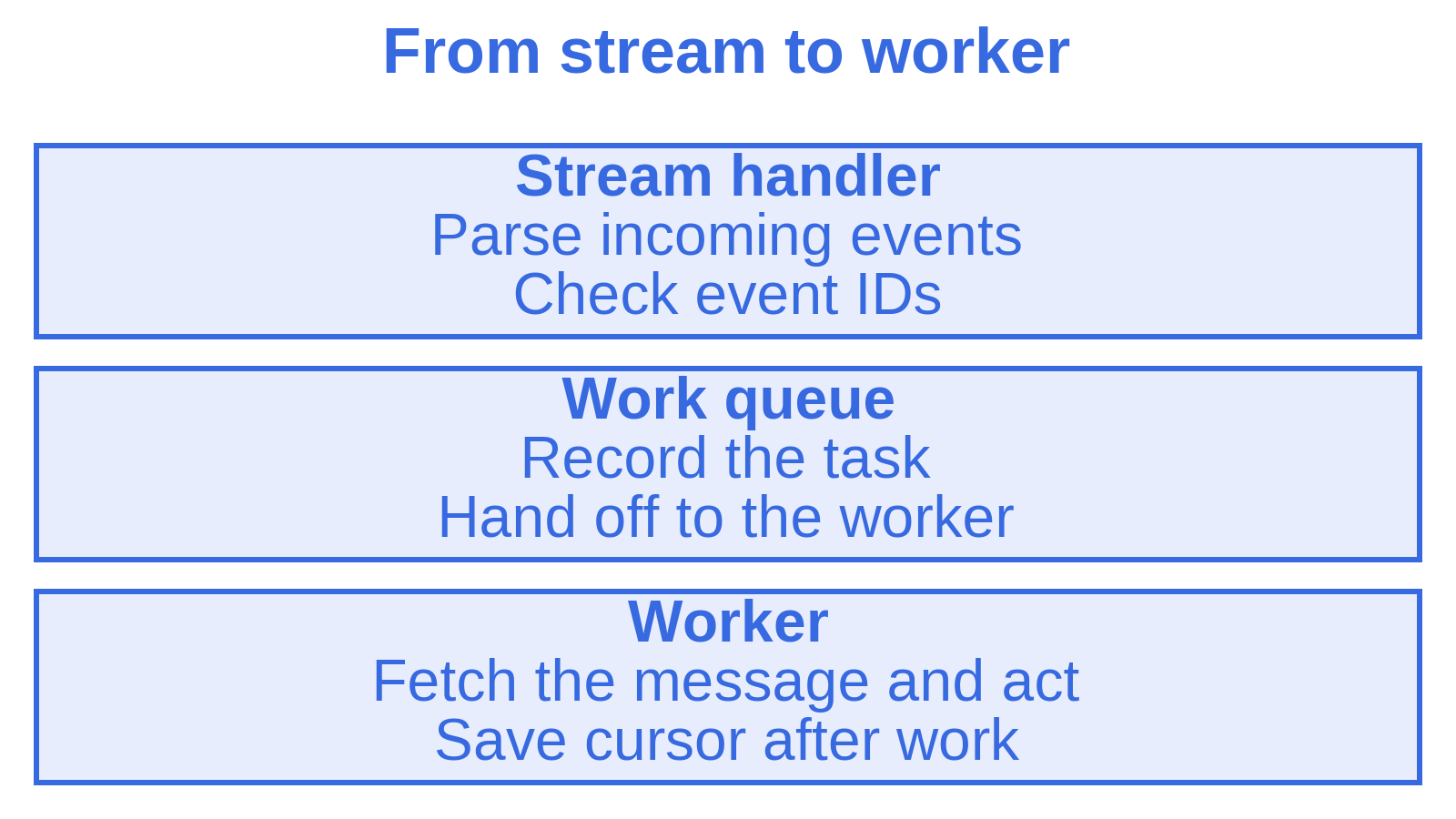
Filter before you spend tokens. Use the event type and the metadata to skip mail the agent should never see (automated bounces, mail in folders it does not own). Fetch the cleaned text only for messages that pass.
Cap concurrency per mailbox. Two messages in one thread arriving seconds apart should be handled in order by one worker, or the agent will send two contradictory replies.
Thread your replies. Set the threading headers so the recipient's client groups your answer with the conversation. Replies that arrive as new threads look like spam and confuse the next inbound event.
Track outbound too. Delivery, bounce and suppression events belong in the same feed or logs. An agent that keeps writing to an address that bounced is damaging your sending reputation, and one that can see suppressions can stop.
Use the tools your framework already speaks. Qubrics offers REST, SDKs and CLI access. An MCP client can use authorised mailbox and sending tools, with access limited to the grant. Use a stream or webhook to notify your app about incoming mail.
Where Qubrics fits
If you are assembling this yourself, you typically need a sending provider, a Gmail OAuth connection or IMAP script for reading, a parser for inbound mail, a webhook relay and separate billing for each. Qubrics uses the Mailbox API to read inbound mail and stream received-message events. The Sending API routes outbound mail. The Management API reads team delivery logs. Webhooks can notify your app of inbound mail and delivery or bounce events. For outbound, use connected Gmail OAuth, Outlook or custom SMTP accounts with a delivery group of eligible providers. Managed Amazon SES is a separate sending option.
Free has a base price of US$0 per month per team, with usage drawn from the team’s starting credit. Pro costs US$7 per month per team plus usage. Enterprise pricing follows the contract. Connected outbound costs US$0.000500 per provider-accepted recipient occurrence. Managed sending costs US$0.000750 per provider-accepted recipient occurrence. Inbound costs US$0.000500 per distinct mailbox delivery, and storage costs US$0.02 per decimal GB-month. Mailboxes count towards the team’s capacity. Find current rates on the pricing page. For the receiving side, see inbound mailboxes. For all the services, see the Qubrics product overview.
Perspective
Most teams we talk to start with a polling loop against a Gmail inbox and a stack of OAuth tokens. It works in the demo. Then tokens expire, the provider rate-limits the account, and the agent goes quiet without anyone noticing.
Give the agent a real mailbox with stored messages, an API that can return clean reply text and a feed that tells it when to look. Keep the event small and fetch current mailbox state after a missed or duplicate notification.
We also think the mailbox, the sending path and the logs belong together. An agent that reads a thread, replies in it and shows up in a delivery log under the same tenant is far easier to run, audit and bill than four services stitched together. That is the problem we built Qubrics to remove.
Getting started
Start small. Create a mailbox for one agent, run the fetch-after-notify loop above against it, and kill the process mid-task to confirm that the cursor and your deduplication behave. You can start with a mailbox on the Free plan within its fixed limits and use the team’s starting credit. Check the pricing page for plan and usage details. In an AI client, use authorised read and send tools through the MCP option for AI agent builders.
Sources
Recommended
Frequently Asked Questions
Is SSE better than webhooks for email?
Use SSE for agents that can hold a connection open and have no public URL, such as self-hosted assistants, workers and local tools. Use webhooks for backends that expose HTTPS endpoints and for serverless functions. You can use both a stream and webhook delivery with retries.
Does an email SSE event contain the message?
For your own feed, start with an event ID, type and cursor. Fetch the cleaned message from the mailbox API when the agent needs it. Qubrics’s received-message stream includes metadata and a capped body snapshot. Fetch the full message from the mailbox when you need it.
How do I avoid losing mail when the connection drops?
Persist the last processed event ID or state token after its work is durable. For stream replay, reconnect with the saved event ID. When the replay window has passed, sync from mailbox state or run a filtered query for recent unread mail.
Why does my SSE stream connect but deliver nothing?
The usual cause is a proxy or CDN buffering the response, or an idle timeout shorter than the heartbeat interval. Turn off buffering on every hop and set timeouts above the ping interval. Also check that the host can keep a long-lived connection open, which many serverless platforms cannot.
Can I give each tenant its own stream?
Yes. Give each tenant its own mailbox within your team’s limits and use a credential scoped to that mailbox. Filter events on the server. Qubrics exposes mailbox quota use through the Mailbox API and team delivery logs through the Management API.
