Connect MailWizz to Qubrics, set humanised sending limits, and run cold email outreach campaigns with scheduled follow-ups and signed feedback.
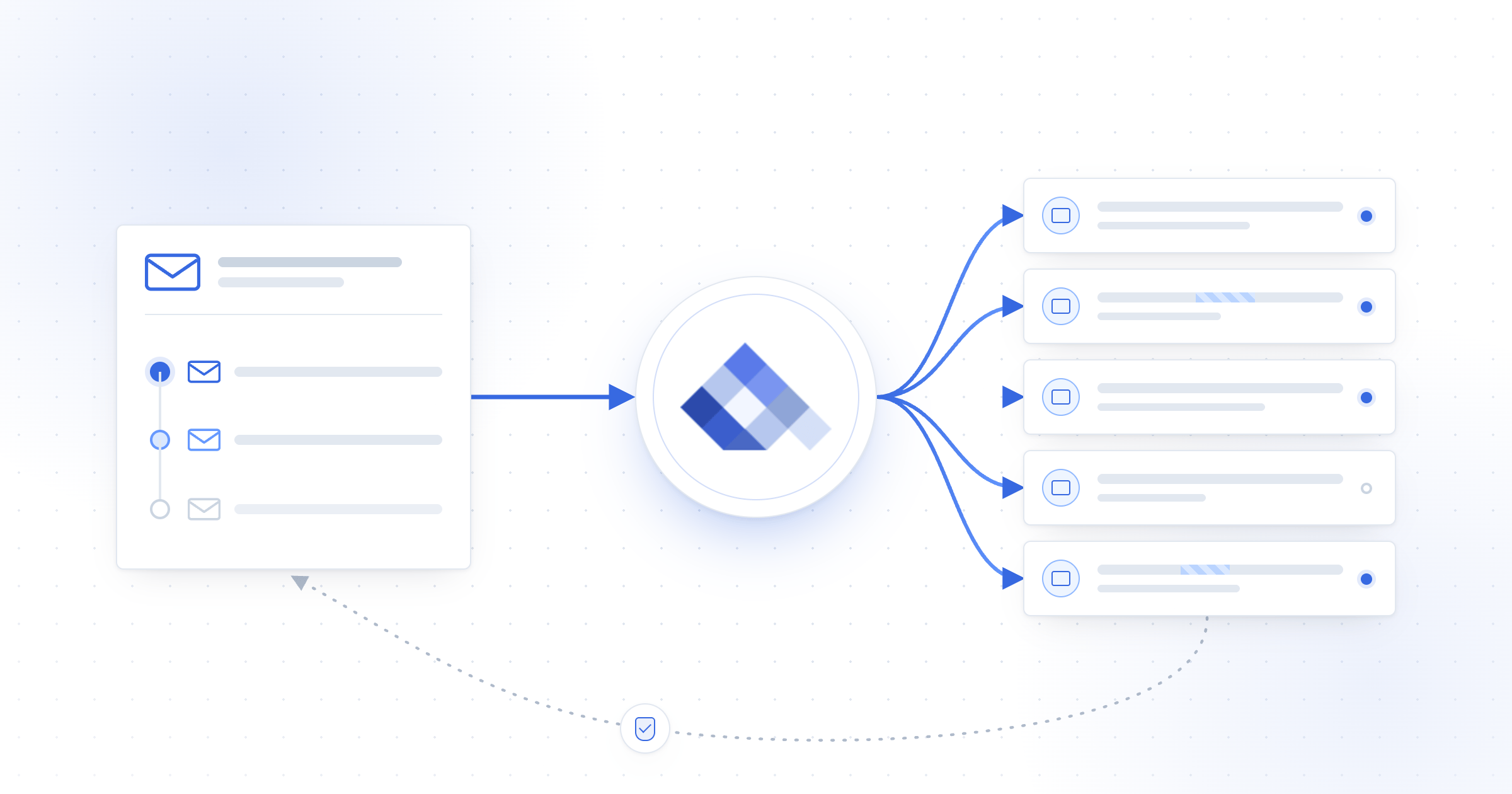
Connect MailWizz to Qubrics when you want MailWizz to manage prospects, campaign content, schedules and follow-ups while Qubrics manages eligible sending accounts, routing and sending limits. You configure one Qubrics delivery server in MailWizz, then use it across your outreach sequence.
Before you start, use MailWizz 2.0.34 or later. You also need a Qubrics
team with an active sending account and a publicly reachable MailWizz
frontend URL using HTTPS.
Set up MailWizz with Qubrics
1
Install the extension and connect Qubrics
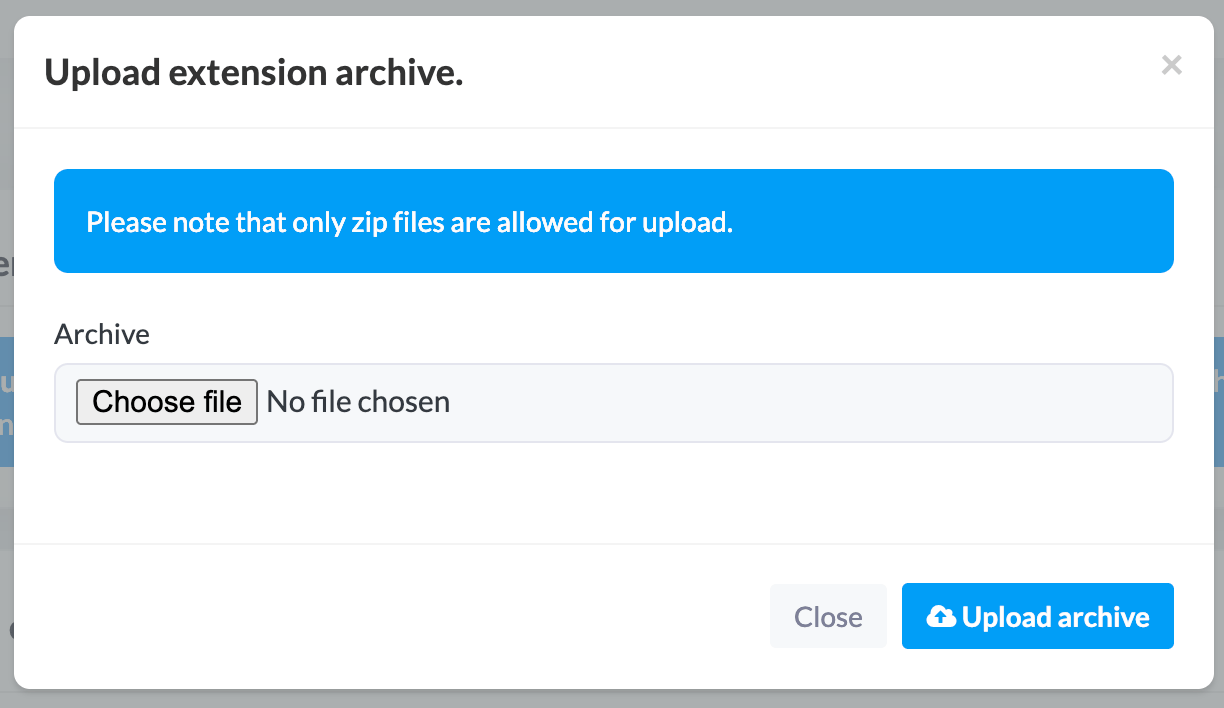
Download the latest Qubrics extension. In the MailWizz backend, open Extend → Extensions → Upload extension, upload the archive and enable Qubrics Sending API.
Upload the Qubrics extension ZIP in MailWizz.
In Qubrics, open API Keys, create a send-capable mailbox key and copy
the reveal-once value beginning with smx_mbx_.In MailWizz, open Delivery servers → Create new, select Qubrics
Web API, paste the key into Sending Key and complete the sender
fields. Save the server. It remains inactive until you connect signed
feedback.Reopen the server and select Info to copy its webhook URL. In Qubrics,
open Webhooks → Create webhook, use that URL and subscribe to
message.bounced and message.complained. Copy the reveal-once whsec_
secret back into Webhook signing secret in MailWizz. Save, test and
activate the delivery server.
2
Add sending accounts and set limits
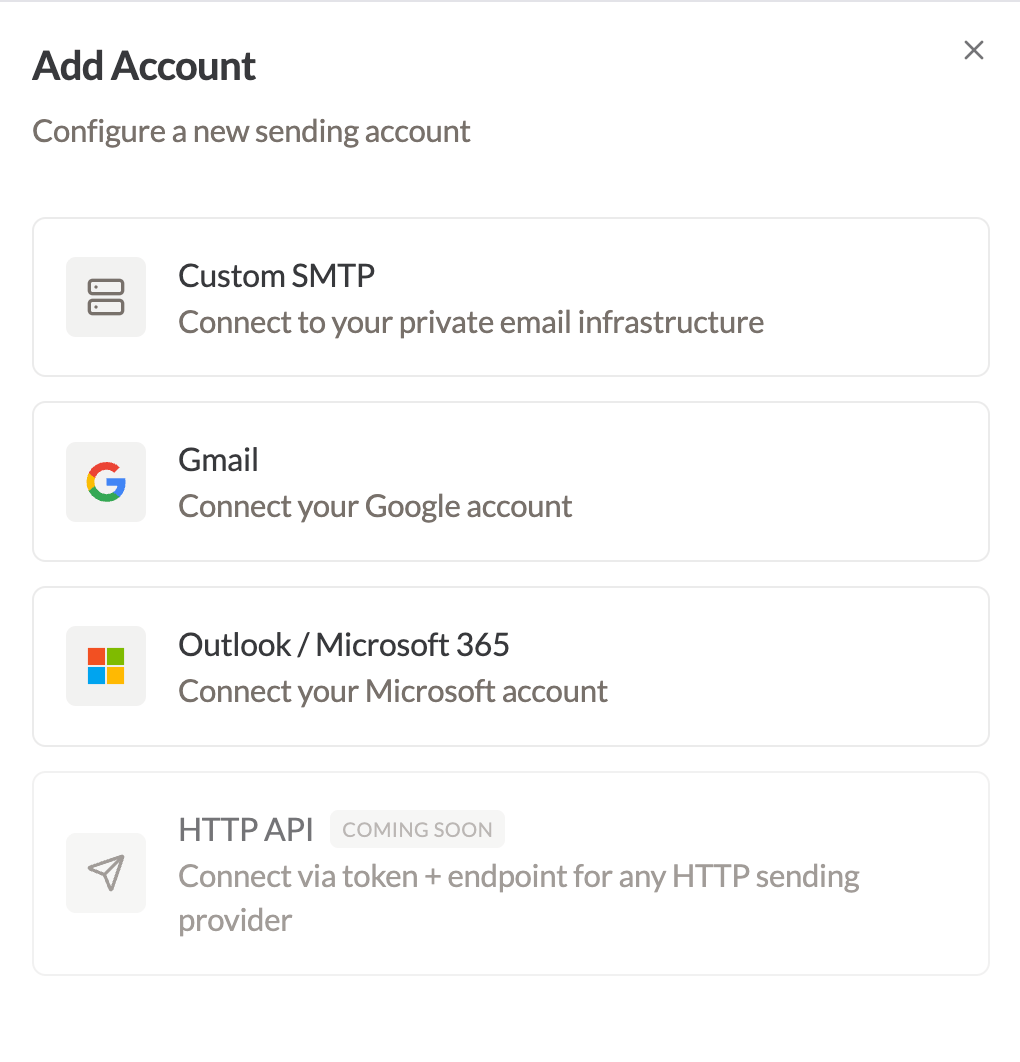
In Qubrics, open Accounts → Add Account. Add each account you want
in your outreach pool, complete its connection details and run the
available test.
Choose the connection type for each Qubrics sending account.
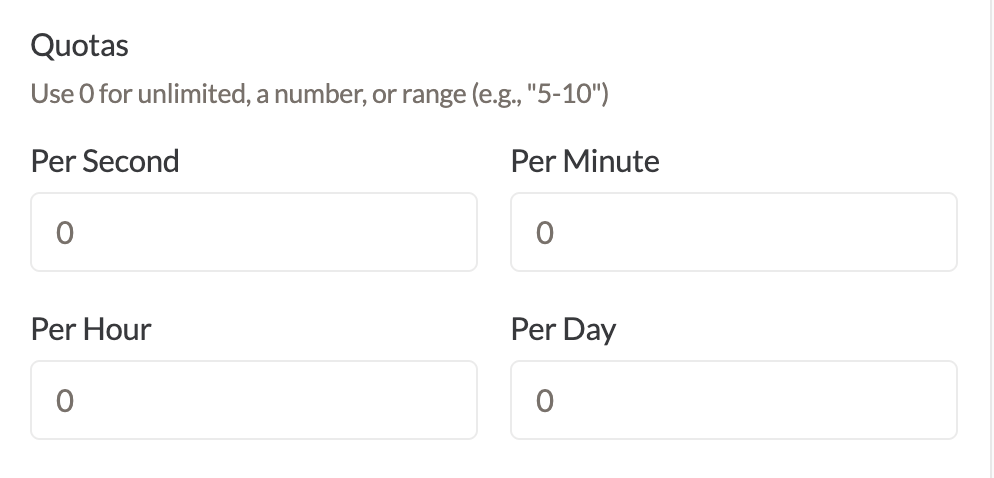
Set accurate From and Reply-To details for each account. Then configure
fixed limits or minimum-to-maximum ranges for supported per-second,
per-minute, per-hour and per-day windows.
Set fixed or ranged quotas for each sending window.
Choose limits that fit the account’s history and provider policy. A range
such as 5–10 lets Qubrics periodically select an active cap inside those
boundaries. Messages above the current cap wait until capacity is
available.
3
Start the campaign and follow-ups
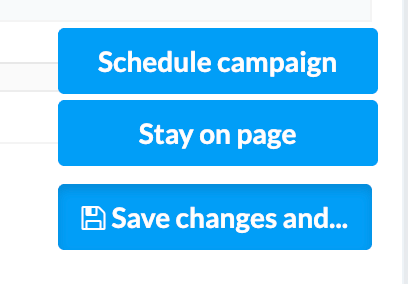
Create a regular MailWizz campaign for your prospect list. Choose the
audience, write the message and complete the normal scheduling steps.
Use MailWizz's campaign actions to schedule or save your work.
Build each follow-up as a separate MailWizz autoresponder campaign,
triggered after the original campaign is sent or opened. Set the delay and
time unit deliberately, then read the full sequence as the recipient
before activation.Use a separate campaign for every intended follow-up. Both the original
campaign and its follow-ups use the same Qubrics delivery server, so
account eligibility and sending limits continue to apply.
Send only to people you may lawfully contact. Keep your targeting relevant,
identify the sender accurately, honour suppression records and provide a
clear way to stop further contact.
How MailWizz and Qubrics divide the work
MailWizz owns the campaign workflow. Qubrics decides which eligible account can send and enforces that account’s current limits. This keeps lists and automations in MailWizz without recreating every sending account as a separate delivery server.
MailWizz
Qubrics
Lists, subscribers and segments
Connected sending accounts
Campaign content and schedules
Account eligibility and routing
Autoresponder conditions and delays
Per-second, minute, hour and day caps
Campaign bounce and complaint actions
Signed bounce and complaint events
Choose fixed limits or ranges
Use a fixed cap when you want one predictable ceiling. Use a range when the active ceiling may move within approved boundaries. Qubrics selects a value when account information refreshes and keeps that cap until the next refresh.A range varies the sending ceiling. It does not add a random delay to each message or guarantee inbox placement. Good targeting, authenticated sender domains, relevant content and a healthy account history still matter.
How feedback returns to MailWizz
The extension includes MailWizz campaign and subscriber identifiers with campaign sends. When Qubrics reports a bounce or complaint, MailWizz verifies the signed event and matches it to the campaign, subscriber and delivery server that recorded the send before changing subscriber state.
Qubrics event
MailWizz result
Permanent bounce
Records a hard bounce and normally blacklists the subscriber.
Transient bounce
Records a soft bounce.
Undetermined bounce
Records an internal bounce.
Complaint
Applies MailWizz feedback handling and blacklists the subscriber.
Invalid, unsigned or unmatched webhook calls cannot alter campaign records. If a later bounce has a stronger classification, the extension preserves that stronger result.
What queued means
queued means Qubrics accepted the message for processing. It does not mean the recipient system accepted it or that it reached the inbox. Final delivery still depends on the selected account, the recipient system, message quality and sender reputation.
Check before your first campaign
Test and activate the Qubrics delivery server in MailWizz.
Confirm at least one eligible sending account is active.
Review From, Reply-To and sending limits for every account.
Confirm the feedback webhook has its saved whsec_ secret.
Check prospect sourcing, suppression and opt-out handling.
Read the original campaign and every follow-up from start to finish.
Start with a controlled campaign. Check delivery logs, bounces, complaints and replies before you raise volume.
Common questions
Do I need a separate MailWizz bounce server?
Not for campaign feedback handled by this integration. The signed webhook
writes correlated bounces and complaints into MailWizz. Keep it active and
monitor failed webhook deliveries in Qubrics.
Can Qubrics use multiple sending accounts?
Yes. Add each account to Qubrics and configure its sender details, limits
and routing. Qubrics chooses among eligible active accounts for the key
used by the MailWizz delivery server.
Why is the delivery server inactive?
A new server remains inactive until its webhook signing secret is saved.
MailWizz also deactivates it after a credential change so you can test the
new configuration before campaigns use it.
Can I reuse one autoresponder for repeated sends?
Use a separate MailWizz campaign for each intended follow-up. Deliberately
re-entering the same subscriber into the same autoresponder during the
Qubrics idempotency window is not supported.
Related guides
Sending accounts
Add accounts and configure sender defaults, limits and routing.
Delivery groups
Keep selected sending accounts together for a chosen traffic stream.
Dashboard and logs
Review message status and investigate delivery activity.
Deliverability
Monitor bounce rates, complaint rates and account health.
{"docsConfig":{"theme":"almond","$schema":"https://mintlify.com/docs.json","name":"Qubrics","description":"The intelligent email layer","colors":{"primary":"#6a75f1","light":"#5a84e9","dark":"#004aad"},"logo":{"light":"https://mintcdn.com/sendmux/9EML6-L2IAWgIXVX/images/logo-light.svg?fit=max\u0026auto=format\u0026n=9EML6-L2IAWgIXVX\u0026q=85\u0026s=0d301b6a4a28e21cf585335973584967","dark":"https://mintcdn.com/sendmux/9EML6-L2IAWgIXVX/images/logo-dark.svg?fit=max\u0026auto=format\u0026n=9EML6-L2IAWgIXVX\u0026q=85\u0026s=612f5f9e57f97fd13812a619d185a2f9","href":"https://qubrics.com/docs"},"favicon":"https://mintcdn.com/sendmux/9EML6-L2IAWgIXVX/images/logo-light.svg?fit=max\u0026auto=format\u0026n=9EML6-L2IAWgIXVX\u0026q=85\u0026s=0d301b6a4a28e21cf585335973584967","api":{"params":{"expanded":"all"},"playground":{"display":"interactive"},"examples":{"defaults":"required","languages":["curl","python","javascript","go"],"autogenerate":true}},"appearance":{"default":"system"},"navbar":{"links":[{"href":"/changelog","label":"Changelog"},{"href":"mailto:contact@qubrics.com","label":"Support"}],"primary":{"type":"button","label":"App","href":"https://app.qubrics.com"}},"footer":{"socials":{"x":"https://x.com/sendmux","github":"https://github.com/qubrics"}},"seo":{"metatags":{"canonical":"https://qubrics.com/docs"}},"fonts":{"family":"Lato","weight":400},"contextual":{"options":["copy","view","chatgpt","claude","perplexity","mcp","cursor","vscode"],"display":"header"},"styling":{"latex":false},"navigation":{"global":{"anchors":[{"anchor":"App","href":"https://app.qubrics.com"},{"anchor":"Website","href":"https://qubrics.com"}]},"pages":[]}},"deployment":{"deploymentMetadataValue":{"subdomain":"sendmux","hasAudioNarration":false,"actualSubdomain":"sendmux","customDomains":["sendmux.ai"],"gitSource":{"type":"github","owner":"qubrics","repo":"docs","deployBranch":"main","contentDirectory":"","isPrivate":false,"mountPath":"","label":""},"feedback":{"thumbs":true,"edits":true,"issues":true,"agentFeedback":true},"entitlements":{},"buildId":"6afbb1b8a017c34cfd2fe8fa","clientVersion":"0.0.4167","searchFilterCounts":[{"language":"default","tag":"Guides","count":80},{"language":"default","tag":"Mailbox API","count":65},{"language":"default","tag":"Management API","count":58},{"language":"default","tag":"AI integrations","count":32},{"language":"default","tag":"MCP","count":23},{"language":"default","tag":"Client setup","count":23},{"language":"default","tag":"Developer tools","count":21},{"language":"default","tag":"Sending accounts","count":18},{"language":"default","tag":"Mailboxes","count":15},{"language":"default","tag":"Messages","count":14}]},"assistantConfig":{"enableAskAiButton":false,"enableStarterQuestions":false,"enableContextualStarterQuestions":false,"enableAskAiSearchBar":true},"basePath":"/docs","hasChatPermissions":false,"hasWebMcpPermissions":false,"toggles":[{"name":"kill-isr","enabled":true,"variant":{"name":"disabled","enabled":false,"feature_enabled":true},"impressionData":false},{"name":"custom-rbac-roles","enabled":true,"variant":{"name":"disabled","enabled":false,"feature_enabled":true},"impressionData":false},{"name":"agent-mintlify-slack","enabled":true,"variant":{"name":"disabled","enabled":false,"feature_enabled":true},"impressionData":false},{"name":"agent-integrations-settings","enabled":true,"variant":{"name":"disabled","enabled":false,"feature_enabled":true},"impressionData":false},{"name":"rbac-expansion","enabled":true,"variant":{"name":"disabled","enabled":false,"feature_enabled":true},"impressionData":false},{"name":"automations-pr-grouping","enabled":true,"variant":{"name":"disabled","enabled":false,"feature_enabled":true},"impressionData":false},{"name":"custom-prefix","enabled":true,"variant":{"name":"disabled","enabled":false,"feature_enabled":true},"impressionData":false},{"name":"analytics-v7","enabled":true,"variant":{"name":"disabled","enabled":false,"feature_enabled":true},"impressionData":false},{"name":"user-flows-analytics","enabled":true,"variant":{"name":"disabled","enabled":false,"feature_enabled":true},"impressionData":false},{"name":"no-publish-flow","enabled":true,"variant":{"name":"disabled","enabled":false,"feature_enabled":true},"impressionData":false},{"name":"workos-onboarding","enabled":true,"variant":{"name":"disabled","enabled":false,"feature_enabled":true},"impressionData":false},{"name":"snapshot-serving-live","enabled":true,"variant":{"name":"disabled","enabled":false,"feature_enabled":true},"impressionData":false},{"name":"stripTemperatureMiddleware","enabled":true,"variant":{"name":"disabled","enabled":false,"feature_enabled":true},"impressionData":false},{"name":"support-platform-pylon-zendesk","enabled":true,"variant":{"name":"disabled","enabled":false,"feature_enabled":true},"impressionData":false},{"name":"snapshot-serving","enabled":true,"variant":{"name":"disabled","enabled":false,"feature_enabled":true},"impressionData":false},{"name":"instant-rollback","enabled":true,"variant":{"name":"disabled","enabled":false,"feature_enabled":true},"impressionData":false},{"name":"granular-notifications-server","enabled":true,"variant":{"name":"disabled","enabled":false,"feature_enabled":true},"impressionData":false},{"name":"granular-notifications","enabled":true,"variant":{"name":"disabled","enabled":false,"feature_enabled":true},"impressionData":false},{"name":"automations-fable","enabled":true,"variant":{"name":"disabled","enabled":false,"feature_enabled":true},"impressionData":false},{"name":"fixed-ai-action-pricing","enabled":true,"variant":{"name":"disabled","enabled":false,"feature_enabled":true},"impressionData":false},{"name":"automation-resolve-merge-conflict","enabled":true,"variant":{"name":"disabled","enabled":false,"feature_enabled":true},"impressionData":false},{"name":"scoped-publishing","enabled":true,"variant":{"name":"disabled","enabled":false,"feature_enabled":true},"impressionData":false},{"name":"mintql","enabled":true,"variant":{"name":"disabled","enabled":false,"feature_enabled":true},"impressionData":false},{"name":"page-level-analytics","enabled":true,"variant":{"name":"disabled","enabled":false,"feature_enabled":true},"impressionData":false},{"name":"editor-version-history-v2","enabled":true,"variant":{"name":"disabled","enabled":false,"feature_enabled":true},"impressionData":false},{"name":"billing-page-v2","enabled":true,"variant":{"name":"disabled","enabled":false,"feature_enabled":true},"impressionData":false},{"name":"full-page-search","enabled":true,"variant":{"name":"disabled","enabled":false,"feature_enabled":true},"impressionData":false},{"name":"workspace-projects","enabled":true,"variant":{"name":"disabled","enabled":false,"feature_enabled":true},"impressionData":false},{"name":"assistant-v5","enabled":true,"variant":{"name":"disabled","enabled":false,"feature_enabled":true},"impressionData":false},{"name":"fork-pr-previews","enabled":true,"variant":{"name":"disabled","enabled":false,"feature_enabled":true},"impressionData":false},{"name":"revalidation-jwt","enabled":true,"variant":{"name":"disabled","enabled":false,"feature_enabled":true},"impressionData":false},{"name":"workos-sso-scim","enabled":true,"variant":{"name":"disabled","enabled":false,"feature_enabled":true},"impressionData":false},{"name":"hobby-abuse-scan","enabled":true,"variant":{"name":"disabled","enabled":false,"feature_enabled":true},"impressionData":false},{"name":"dashboard-inbox","enabled":true,"variant":{"name":"disabled","enabled":false,"feature_enabled":true},"impressionData":false},{"name":"workos-signup","enabled":true,"variant":{"name":"disabled","enabled":false,"feature_enabled":true},"impressionData":false},{"name":"turbopuffer-dual-write","enabled":true,"variant":{"name":"disabled","enabled":false,"feature_enabled":true},"impressionData":false},{"name":"workos-enabled","enabled":true,"variant":{"name":"disabled","enabled":false,"feature_enabled":true},"impressionData":false},{"name":"approve-review-flow","enabled":true,"variant":{"name":"disabled","enabled":false,"feature_enabled":true},"impressionData":false},{"name":"editor-metadata","enabled":true,"variant":{"name":"disabled","enabled":false,"feature_enabled":true},"impressionData":false},{"name":"sso-setup-deadline-banner","enabled":true,"variant":{"name":"disabled","enabled":false,"feature_enabled":true},"impressionData":false},{"name":"turbopuffer-serve","enabled":true,"variant":{"name":"disabled","enabled":false,"feature_enabled":true},"impressionData":false},{"name":"live-agents","enabled":true,"variant":{"name":"disabled","enabled":false,"feature_enabled":true},"impressionData":false},{"name":"llms-txt-v2","enabled":true,"variant":{"name":"disabled","enabled":false,"feature_enabled":true},"impressionData":false}],"googleFontsInlined":true},"customCss":[{"filePath":"style.css","content":":root{font-size:103%}.antialiased{-webkit-font-smoothing:auto!important;-moz-osx-font-smoothing:auto!important}.h1,.h2,.h3,.h4,.h5,.h6,h1,h2,h3,h4,h5,h6,.prose h1,.prose h2,.prose h3,.prose h4,.prose h5,.prose h6{letter-spacing:var(--tracking-tight)!important}body,.prose,.prose p,.prose li,.prose td,.prose th,.prose blockquote{letter-spacing:0.00625rem!important}.eyebrow.h-5{text-transform:uppercase;letter-spacing:0.063em!important}h3.sidebar-title,#sidebar-title{display:flex;align-items:center;height:1.75rem;color:oklch(0.345 0.006 264 / 60%);text-transform:uppercase;font-size:0.7rem;font-weight:400;letter-spacing:0.044rem!important}.dark h3.sidebar-title,.dark #sidebar-title{color:oklch(0.985 0.001 106.423 / 60%)}"}],"page":{"pagePath":"integrations/email-marketing/mailwizz","slug":"/integrations/email-marketing/mailwizz","pageMetadata":{"title":"Use Qubrics with MailWizz for cold email outreach","sidebarTitle":"MailWizz","description":"Connect MailWizz to Qubrics, set humanised sending limits, and run cold email outreach campaigns with scheduled follow-ups and signed feedback.","keywords":["Qubrics MailWizz integration","MailWizz cold email","cold email outreach","MailWizz follow-up campaign","email sending limits","MailWizz delivery server"],"og:title":"Use Qubrics with MailWizz for cold email outreach","og:description":"Connect MailWizz to Qubrics, manage sending accounts and limits, and run prospecting campaigns with follow-ups.","og:image":"https://qubrics.com/docs/images/integrations/email-marketing/sendmux-mailwizz-integration.png","href":"/integrations/email-marketing/mailwizz"},"description":{"compiledSource":"\"use strict\";\nconst {jsx: _jsx} = arguments[0];\nconst {useMDXComponents: _provideComponents} = arguments[0];\nfunction _createMdxContent(props) {\n const _components = {\n p: \"p\",\n ..._provideComponents(),\n ...props.components\n };\n return _jsx(_components.p, {\n children: \"Connect MailWizz to Qubrics, set humanised sending limits, and run cold email outreach campaigns with scheduled follow-ups and signed feedback.\"\n });\n}\nfunction MDXContent(props = {}) {\n const {wrapper: MDXLayout} = {\n ..._provideComponents(),\n ...props.components\n };\n return MDXLayout ? _jsx(MDXLayout, {\n ...props,\n children: _jsx(_createMdxContent, {\n ...props\n })\n }) : _createMdxContent(props);\n}\nreturn {\n default: MDXContent\n};\n","frontmatter":{},"scope":{}},"pageType":"default","mdx":{"mdxSource":{"compiledSource":"\"use strict\";const{Fragment:_Fragment,jsx:_jsx,jsxs:_jsxs}=arguments[0];const{useMDXComponents:_provideComponents}=arguments[0];function _createMdxContent(props){const _components={code:`code`,li:`li`,p:`p`,strong:`strong`,tbody:`tbody`,td:`td`,th:`th`,thead:`thead`,tr:`tr`,ul:`ul`,..._provideComponents(),...props.components},{Accordion,AccordionGroup,Card,Columns,Frame,Heading,Info,OptimizedImage,Step,Steps,Table,Warning}=_components;if(!Accordion)_missingMdxReference(`Accordion`,true);if(!AccordionGroup)_missingMdxReference(`AccordionGroup`,true);if(!Card)_missingMdxReference(`Card`,true);if(!Columns)_missingMdxReference(`Columns`,true);if(!Frame)_missingMdxReference(`Frame`,true);if(!Heading)_missingMdxReference(`Heading`,true);if(!Info)_missingMdxReference(`Info`,true);if(!OptimizedImage)_missingMdxReference(`OptimizedImage`,true);if(!Step)_missingMdxReference(`Step`,true);if(!Steps)_missingMdxReference(`Steps`,true);if(!Table)_missingMdxReference(`Table`,true);if(!Warning)_missingMdxReference(`Warning`,true);return _jsxs(_Fragment,{children:[_jsx(_components.p,{children:`Connect MailWizz to Qubrics when you want MailWizz to manage prospects, campaign content, schedules and follow-ups while Qubrics manages eligible sending accounts, routing and sending limits. You configure one Qubrics delivery server in MailWizz, then use it across your outreach sequence.`}),`\n`,_jsx(Frame,{children:_jsx(OptimizedImage,{src:`https://mintcdn.com/sendmux/9EML6-L2IAWgIXVX/images/integrations/email-marketing/sendmux-mailwizz-integration.png?fit=max\u0026auto=format\u0026n=9EML6-L2IAWgIXVX\u0026q=85\u0026s=61476dca302b2a9363229315f3838556`,alt:`MailWizz campaign messages passing through Qubrics to several eligible sending accounts, with delivery feedback returning to MailWizz`,\"data-og-width\":`2400`,width:`2400`,\"data-og-height\":`1260`,height:`1260`,\"data-path\":`images/integrations/email-marketing/sendmux-mailwizz-integration.png`,\"data-optimize\":`true`,\"data-opv\":`3`,srcset:`https://mintcdn.com/sendmux/9EML6-L2IAWgIXVX/images/integrations/email-marketing/sendmux-mailwizz-integration.png?w=280\u0026fit=max\u0026auto=format\u0026n=9EML6-L2IAWgIXVX\u0026q=85\u0026s=615aca8c13807d788e61e2502ed9d767 280w, https://mintcdn.com/sendmux/9EML6-L2IAWgIXVX/images/integrations/email-marketing/sendmux-mailwizz-integration.png?w=560\u0026fit=max\u0026auto=format\u0026n=9EML6-L2IAWgIXVX\u0026q=85\u0026s=b505d582b449019d6403ec1b86988e63 560w, https://mintcdn.com/sendmux/9EML6-L2IAWgIXVX/images/integrations/email-marketing/sendmux-mailwizz-integration.png?w=840\u0026fit=max\u0026auto=format\u0026n=9EML6-L2IAWgIXVX\u0026q=85\u0026s=9458a5b73a53771abd97e74632c659a9 840w, https://mintcdn.com/sendmux/9EML6-L2IAWgIXVX/images/integrations/email-marketing/sendmux-mailwizz-integration.png?w=1100\u0026fit=max\u0026auto=format\u0026n=9EML6-L2IAWgIXVX\u0026q=85\u0026s=2ad15cb99dcd60f001433924897f5532 1100w, https://mintcdn.com/sendmux/9EML6-L2IAWgIXVX/images/integrations/email-marketing/sendmux-mailwizz-integration.png?w=1650\u0026fit=max\u0026auto=format\u0026n=9EML6-L2IAWgIXVX\u0026q=85\u0026s=77d3ed818ed5528376cf04256eef86ae 1650w, https://mintcdn.com/sendmux/9EML6-L2IAWgIXVX/images/integrations/email-marketing/sendmux-mailwizz-integration.png?w=2500\u0026fit=max\u0026auto=format\u0026n=9EML6-L2IAWgIXVX\u0026q=85\u0026s=e2c51c07949fc4a387e01550ffc4c9f1 2500w`})}),`\n`,_jsx(Info,{children:_jsx(_components.p,{children:`Before you start, use MailWizz 2.0.34 or later. You also need a Qubrics\nteam with an active sending account and a publicly reachable MailWizz\nfrontend URL using HTTPS.`})}),`\n`,_jsx(Heading,{level:`2`,id:`set-up-mailwizz-with-qubrics`,children:`Set up MailWizz with Qubrics`}),`\n`,_jsxs(Steps,{children:[_jsxs(Step,{title:`Install the extension and connect Qubrics`,children:[_jsxs(_components.p,{children:[_jsx(`a`,{href:`https://github.com/qubrics/mailwizz-smtp-proxy/releases/latest/download/sendmux-web-api.zip`,rel:`nofollow noopener noreferrer`,target:`_blank`,children:`Download the latest Qubrics extension`}),`. In the MailWizz backend, open `,_jsx(_components.strong,{children:`Extend`}),` → `,_jsx(_components.strong,{children:`Extensions`}),` → `,_jsx(_components.strong,{children:`Upload extension`}),`, upload the archive and enable `,_jsx(_components.strong,{children:`Qubrics Sending API`}),`.`]}),_jsx(Frame,{caption:`Upload the Qubrics extension ZIP in MailWizz.`,children:_jsx(OptimizedImage,{src:`https://mintcdn.com/sendmux/_GvW9aB1nNqc9iLf/images/integrations/email-marketing/mailwizz-upload-extension.png?fit=max\u0026auto=format\u0026n=_GvW9aB1nNqc9iLf\u0026q=85\u0026s=737679e1ef00b76d5ed48538925d70f4`,alt:`MailWizz upload extension dialog with a ZIP archive chooser and Upload archive button`,\"data-og-width\":`1224`,width:`1224`,\"data-og-height\":`708`,height:`708`,\"data-path\":`images/integrations/email-marketing/mailwizz-upload-extension.png`,\"data-optimize\":`true`,\"data-opv\":`3`,srcset:`https://mintcdn.com/sendmux/_GvW9aB1nNqc9iLf/images/integrations/email-marketing/mailwizz-upload-extension.png?w=280\u0026fit=max\u0026auto=format\u0026n=_GvW9aB1nNqc9iLf\u0026q=85\u0026s=919cd7c7307721258f620e05e9decde0 280w, https://mintcdn.com/sendmux/_GvW9aB1nNqc9iLf/images/integrations/email-marketing/mailwizz-upload-extension.png?w=560\u0026fit=max\u0026auto=format\u0026n=_GvW9aB1nNqc9iLf\u0026q=85\u0026s=3eb194b82824bd281dece88321c225bd 560w, https://mintcdn.com/sendmux/_GvW9aB1nNqc9iLf/images/integrations/email-marketing/mailwizz-upload-extension.png?w=840\u0026fit=max\u0026auto=format\u0026n=_GvW9aB1nNqc9iLf\u0026q=85\u0026s=208f4574fd3296b7f5ac9d6d60aa8f4c 840w, https://mintcdn.com/sendmux/_GvW9aB1nNqc9iLf/images/integrations/email-marketing/mailwizz-upload-extension.png?w=1100\u0026fit=max\u0026auto=format\u0026n=_GvW9aB1nNqc9iLf\u0026q=85\u0026s=e1c66dfdf7d318ba824c59d7c463fd00 1100w, https://mintcdn.com/sendmux/_GvW9aB1nNqc9iLf/images/integrations/email-marketing/mailwizz-upload-extension.png?w=1650\u0026fit=max\u0026auto=format\u0026n=_GvW9aB1nNqc9iLf\u0026q=85\u0026s=6ba0256ec0be2935d403e6049765b398 1650w, https://mintcdn.com/sendmux/_GvW9aB1nNqc9iLf/images/integrations/email-marketing/mailwizz-upload-extension.png?w=2500\u0026fit=max\u0026auto=format\u0026n=_GvW9aB1nNqc9iLf\u0026q=85\u0026s=9e08bcfc5fc5b774886f1ce48d70e94e 2500w`})}),_jsxs(_components.p,{children:[`In Qubrics, open `,_jsx(_components.strong,{children:`API Keys`}),`, create a send-capable mailbox key and copy\nthe reveal-once value beginning with `,_jsx(_components.code,{children:`smx_mbx_`}),`.`]}),_jsxs(_components.p,{children:[`In MailWizz, open `,_jsx(_components.strong,{children:`Delivery servers`}),` → `,_jsx(_components.strong,{children:`Create new`}),`, select `,_jsx(_components.strong,{children:`Qubrics\nWeb API`}),`, paste the key into `,_jsx(_components.strong,{children:`Sending Key`}),` and complete the sender\nfields. Save the server. It remains inactive until you connect signed\nfeedback.`]}),_jsxs(_components.p,{children:[`Reopen the server and select `,_jsx(_components.strong,{children:`Info`}),` to copy its webhook URL. In Qubrics,\nopen `,_jsx(_components.strong,{children:`Webhooks`}),` → `,_jsx(_components.strong,{children:`Create webhook`}),`, use that URL and subscribe to\n`,_jsx(_components.code,{children:`message.bounced`}),` and `,_jsx(_components.code,{children:`message.complained`}),`. Copy the reveal-once `,_jsx(_components.code,{children:`whsec_`}),`\nsecret back into `,_jsx(_components.strong,{children:`Webhook signing secret`}),` in MailWizz. Save, test and\nactivate the delivery server.`]})]}),_jsxs(Step,{title:`Add sending accounts and set limits`,children:[_jsxs(_components.p,{children:[`In Qubrics, open `,_jsx(_components.strong,{children:`Accounts`}),` → `,_jsx(_components.strong,{children:`Add Account`}),`. Add each account you want\nin your outreach pool, complete its connection details and run the\navailable test.`]}),_jsx(Frame,{caption:`Choose the connection type for each Qubrics sending account.`,children:_jsx(OptimizedImage,{src:`https://mintcdn.com/sendmux/_GvW9aB1nNqc9iLf/images/integrations/email-marketing/sendmux-add-sending-account.png?fit=max\u0026auto=format\u0026n=_GvW9aB1nNqc9iLf\u0026q=85\u0026s=a1c989d6100c7ec57eb246114f53bb86`,alt:`Qubrics Add Account panel showing the available sending account connection types`,\"data-og-width\":`1020`,width:`1020`,\"data-og-height\":`1062`,height:`1062`,\"data-path\":`images/integrations/email-marketing/sendmux-add-sending-account.png`,\"data-optimize\":`true`,\"data-opv\":`3`,srcset:`https://mintcdn.com/sendmux/_GvW9aB1nNqc9iLf/images/integrations/email-marketing/sendmux-add-sending-account.png?w=280\u0026fit=max\u0026auto=format\u0026n=_GvW9aB1nNqc9iLf\u0026q=85\u0026s=2e4413af0d4a04ee30ec0f8d8a9b0a0c 280w, https://mintcdn.com/sendmux/_GvW9aB1nNqc9iLf/images/integrations/email-marketing/sendmux-add-sending-account.png?w=560\u0026fit=max\u0026auto=format\u0026n=_GvW9aB1nNqc9iLf\u0026q=85\u0026s=3c1934cccb74bdd515d66623326b5cde 560w, https://mintcdn.com/sendmux/_GvW9aB1nNqc9iLf/images/integrations/email-marketing/sendmux-add-sending-account.png?w=840\u0026fit=max\u0026auto=format\u0026n=_GvW9aB1nNqc9iLf\u0026q=85\u0026s=8108a136216636f1e5ea03a48e56b0df 840w, https://mintcdn.com/sendmux/_GvW9aB1nNqc9iLf/images/integrations/email-marketing/sendmux-add-sending-account.png?w=1100\u0026fit=max\u0026auto=format\u0026n=_GvW9aB1nNqc9iLf\u0026q=85\u0026s=c1f45b56f13f0d0b5a7f2cdd909b0037 1100w, https://mintcdn.com/sendmux/_GvW9aB1nNqc9iLf/images/integrations/email-marketing/sendmux-add-sending-account.png?w=1650\u0026fit=max\u0026auto=format\u0026n=_GvW9aB1nNqc9iLf\u0026q=85\u0026s=49a051eafeba5eef739e06ecb74898e7 1650w, https://mintcdn.com/sendmux/_GvW9aB1nNqc9iLf/images/integrations/email-marketing/sendmux-add-sending-account.png?w=2500\u0026fit=max\u0026auto=format\u0026n=_GvW9aB1nNqc9iLf\u0026q=85\u0026s=d755f7d76427d835f76f50c70ad54a04 2500w`})}),_jsx(_components.p,{children:`Set accurate From and Reply-To details for each account. Then configure\nfixed limits or minimum-to-maximum ranges for supported per-second,\nper-minute, per-hour and per-day windows.`}),_jsx(Frame,{caption:`Set fixed or ranged quotas for each sending window.`,children:_jsx(OptimizedImage,{src:`https://mintcdn.com/sendmux/_GvW9aB1nNqc9iLf/images/integrations/email-marketing/sendmux-account-quotas.png?fit=max\u0026auto=format\u0026n=_GvW9aB1nNqc9iLf\u0026q=85\u0026s=4d182dd3323fe7b452d8d92eb70024b7`,alt:`Qubrics quota fields for per-second, per-minute, per-hour and per-day sending limits`,\"data-og-width\":`994`,width:`994`,\"data-og-height\":`478`,height:`478`,\"data-path\":`images/integrations/email-marketing/sendmux-account-quotas.png`,\"data-optimize\":`true`,\"data-opv\":`3`,srcset:`https://mintcdn.com/sendmux/_GvW9aB1nNqc9iLf/images/integrations/email-marketing/sendmux-account-quotas.png?w=280\u0026fit=max\u0026auto=format\u0026n=_GvW9aB1nNqc9iLf\u0026q=85\u0026s=d15ccd259e2c665d58e14ddb2aa4a463 280w, https://mintcdn.com/sendmux/_GvW9aB1nNqc9iLf/images/integrations/email-marketing/sendmux-account-quotas.png?w=560\u0026fit=max\u0026auto=format\u0026n=_GvW9aB1nNqc9iLf\u0026q=85\u0026s=5be5e662536ce2493de5180be1195a7b 560w, https://mintcdn.com/sendmux/_GvW9aB1nNqc9iLf/images/integrations/email-marketing/sendmux-account-quotas.png?w=840\u0026fit=max\u0026auto=format\u0026n=_GvW9aB1nNqc9iLf\u0026q=85\u0026s=1a2fed4ce484d4b669c488960d46acbf 840w, https://mintcdn.com/sendmux/_GvW9aB1nNqc9iLf/images/integrations/email-marketing/sendmux-account-quotas.png?w=1100\u0026fit=max\u0026auto=format\u0026n=_GvW9aB1nNqc9iLf\u0026q=85\u0026s=b4cfd564f68a708a6ea655cf07362bb7 1100w, https://mintcdn.com/sendmux/_GvW9aB1nNqc9iLf/images/integrations/email-marketing/sendmux-account-quotas.png?w=1650\u0026fit=max\u0026auto=format\u0026n=_GvW9aB1nNqc9iLf\u0026q=85\u0026s=2cb904ef8f99861f82c229077eda6f0f 1650w, https://mintcdn.com/sendmux/_GvW9aB1nNqc9iLf/images/integrations/email-marketing/sendmux-account-quotas.png?w=2500\u0026fit=max\u0026auto=format\u0026n=_GvW9aB1nNqc9iLf\u0026q=85\u0026s=6fedd14f489d325f2990e80c6a94a13e 2500w`})}),_jsxs(_components.p,{children:[`Choose limits that fit the account’s history and provider policy. A range\nsuch as `,_jsx(_components.code,{children:`5–10`}),` lets Qubrics periodically select an active cap inside those\nboundaries. Messages above the current cap wait until capacity is\navailable.`]})]}),_jsxs(Step,{title:`Start the campaign and follow-ups`,children:[_jsx(_components.p,{children:`Create a regular MailWizz campaign for your prospect list. Choose the\naudience, write the message and complete the normal scheduling steps.`}),_jsx(Frame,{caption:`Use MailWizz's campaign actions to schedule or save your work.`,children:_jsx(OptimizedImage,{src:`https://mintcdn.com/sendmux/_GvW9aB1nNqc9iLf/images/integrations/email-marketing/mailwizz-schedule-campaign.png?fit=max\u0026auto=format\u0026n=_GvW9aB1nNqc9iLf\u0026q=85\u0026s=32413f96fc45139268bc1d1457bf9074`,alt:`MailWizz campaign actions for scheduling the campaign, staying on the page or saving changes`,\"data-og-width\":`408`,width:`408`,\"data-og-height\":`284`,height:`284`,\"data-path\":`images/integrations/email-marketing/mailwizz-schedule-campaign.png`,\"data-optimize\":`true`,\"data-opv\":`3`,srcset:`https://mintcdn.com/sendmux/_GvW9aB1nNqc9iLf/images/integrations/email-marketing/mailwizz-schedule-campaign.png?w=280\u0026fit=max\u0026auto=format\u0026n=_GvW9aB1nNqc9iLf\u0026q=85\u0026s=5cbf8fb3da84773a6de6970bce881f49 280w, https://mintcdn.com/sendmux/_GvW9aB1nNqc9iLf/images/integrations/email-marketing/mailwizz-schedule-campaign.png?w=560\u0026fit=max\u0026auto=format\u0026n=_GvW9aB1nNqc9iLf\u0026q=85\u0026s=52ed1608d22a706dcb6aa082053ae486 560w, https://mintcdn.com/sendmux/_GvW9aB1nNqc9iLf/images/integrations/email-marketing/mailwizz-schedule-campaign.png?w=840\u0026fit=max\u0026auto=format\u0026n=_GvW9aB1nNqc9iLf\u0026q=85\u0026s=169521f78951d58168a87cd1d100c75b 840w, https://mintcdn.com/sendmux/_GvW9aB1nNqc9iLf/images/integrations/email-marketing/mailwizz-schedule-campaign.png?w=1100\u0026fit=max\u0026auto=format\u0026n=_GvW9aB1nNqc9iLf\u0026q=85\u0026s=b038de034ed81ea032273d11707446c0 1100w, https://mintcdn.com/sendmux/_GvW9aB1nNqc9iLf/images/integrations/email-marketing/mailwizz-schedule-campaign.png?w=1650\u0026fit=max\u0026auto=format\u0026n=_GvW9aB1nNqc9iLf\u0026q=85\u0026s=17b2db039f3c6e925a27f06ff5a0e4b1 1650w, https://mintcdn.com/sendmux/_GvW9aB1nNqc9iLf/images/integrations/email-marketing/mailwizz-schedule-campaign.png?w=2500\u0026fit=max\u0026auto=format\u0026n=_GvW9aB1nNqc9iLf\u0026q=85\u0026s=09a8e8882773df9630c372115a3c670c 2500w`})}),_jsx(_components.p,{children:`Build each follow-up as a separate MailWizz autoresponder campaign,\ntriggered after the original campaign is sent or opened. Set the delay and\ntime unit deliberately, then read the full sequence as the recipient\nbefore activation.`}),_jsx(_components.p,{children:`Use a separate campaign for every intended follow-up. Both the original\ncampaign and its follow-ups use the same Qubrics delivery server, so\naccount eligibility and sending limits continue to apply.`})]})]}),`\n`,_jsx(Warning,{children:_jsx(_components.p,{children:`Send only to people you may lawfully contact. Keep your targeting relevant,\nidentify the sender accurately, honour suppression records and provide a\nclear way to stop further contact.`})}),`\n`,_jsx(Heading,{level:`2`,id:`how-mailwizz-and-qubrics-divide-the-work`,children:`How MailWizz and Qubrics divide the work`}),`\n`,_jsx(_components.p,{children:`MailWizz owns the campaign workflow. Qubrics decides which eligible account can send and enforces that account’s current limits. This keeps lists and automations in MailWizz without recreating every sending account as a separate delivery server.`}),`\n`,_jsxs(Table,{children:[_jsx(_components.thead,{children:_jsxs(_components.tr,{children:[_jsx(_components.th,{children:`MailWizz`}),_jsx(_components.th,{children:`Qubrics`})]})}),_jsxs(_components.tbody,{children:[_jsxs(_components.tr,{children:[_jsx(_components.td,{children:`Lists, subscribers and segments`}),_jsx(_components.td,{children:`Connected sending accounts`})]}),_jsxs(_components.tr,{children:[_jsx(_components.td,{children:`Campaign content and schedules`}),_jsx(_components.td,{children:`Account eligibility and routing`})]}),_jsxs(_components.tr,{children:[_jsx(_components.td,{children:`Autoresponder conditions and delays`}),_jsx(_components.td,{children:`Per-second, minute, hour and day caps`})]}),_jsxs(_components.tr,{children:[_jsx(_components.td,{children:`Campaign bounce and complaint actions`}),_jsx(_components.td,{children:`Signed bounce and complaint events`})]})]})]}),`\n`,_jsx(Heading,{level:`2`,id:`choose-fixed-limits-or-ranges`,children:`Choose fixed limits or ranges`}),`\n`,_jsx(_components.p,{children:`Use a fixed cap when you want one predictable ceiling. Use a range when the active ceiling may move within approved boundaries. Qubrics selects a value when account information refreshes and keeps that cap until the next refresh.`}),`\n`,_jsx(_components.p,{children:`A range varies the sending ceiling. It does not add a random delay to each message or guarantee inbox placement. Good targeting, authenticated sender domains, relevant content and a healthy account history still matter.`}),`\n`,_jsx(Heading,{level:`2`,id:`how-feedback-returns-to-mailwizz`,children:`How feedback returns to MailWizz`}),`\n`,_jsx(_components.p,{children:`The extension includes MailWizz campaign and subscriber identifiers with campaign sends. When Qubrics reports a bounce or complaint, MailWizz verifies the signed event and matches it to the campaign, subscriber and delivery server that recorded the send before changing subscriber state.`}),`\n`,_jsxs(Table,{children:[_jsx(_components.thead,{children:_jsxs(_components.tr,{children:[_jsx(_components.th,{children:`Qubrics event`}),_jsx(_components.th,{children:`MailWizz result`})]})}),_jsxs(_components.tbody,{children:[_jsxs(_components.tr,{children:[_jsx(_components.td,{children:`Permanent bounce`}),_jsx(_components.td,{children:`Records a hard bounce and normally blacklists the subscriber.`})]}),_jsxs(_components.tr,{children:[_jsx(_components.td,{children:`Transient bounce`}),_jsx(_components.td,{children:`Records a soft bounce.`})]}),_jsxs(_components.tr,{children:[_jsx(_components.td,{children:`Undetermined bounce`}),_jsx(_components.td,{children:`Records an internal bounce.`})]}),_jsxs(_components.tr,{children:[_jsx(_components.td,{children:`Complaint`}),_jsx(_components.td,{children:`Applies MailWizz feedback handling and blacklists the subscriber.`})]})]})]}),`\n`,_jsx(_components.p,{children:`Invalid, unsigned or unmatched webhook calls cannot alter campaign records. If a later bounce has a stronger classification, the extension preserves that stronger result.`}),`\n`,_jsxs(Heading,{level:`2`,id:`what-queued-means`,children:[`What `,_jsx(_components.code,{children:`queued`}),` means`]}),`\n`,_jsxs(_components.p,{children:[_jsx(_components.code,{children:`queued`}),` means Qubrics accepted the message for processing. It does not mean the recipient system accepted it or that it reached the inbox. Final delivery still depends on the selected account, the recipient system, message quality and sender reputation.`]}),`\n`,_jsx(Heading,{level:`2`,id:`check-before-your-first-campaign`,children:`Check before your first campaign`}),`\n`,_jsxs(_components.ul,{children:[`\n`,_jsx(_components.li,{children:`Test and activate the Qubrics delivery server in MailWizz.`}),`\n`,_jsx(_components.li,{children:`Confirm at least one eligible sending account is active.`}),`\n`,_jsx(_components.li,{children:`Review From, Reply-To and sending limits for every account.`}),`\n`,_jsxs(_components.li,{children:[`Confirm the feedback webhook has its saved `,_jsx(_components.code,{children:`whsec_`}),` secret.`]}),`\n`,_jsx(_components.li,{children:`Check prospect sourcing, suppression and opt-out handling.`}),`\n`,_jsx(_components.li,{children:`Read the original campaign and every follow-up from start to finish.`}),`\n`]}),`\n`,_jsx(_components.p,{children:`Start with a controlled campaign. Check delivery logs, bounces, complaints and replies before you raise volume.`}),`\n`,_jsx(Heading,{level:`2`,id:`common-questions`,children:`Common questions`}),`\n`,_jsxs(AccordionGroup,{children:[_jsx(Accordion,{title:`Do I need a separate MailWizz bounce server?`,id:`do-i-need-a-separate-mailwizz-bounce-server`,children:_jsx(_components.p,{children:`Not for campaign feedback handled by this integration. The signed webhook\nwrites correlated bounces and complaints into MailWizz. Keep it active and\nmonitor failed webhook deliveries in Qubrics.`})}),_jsx(Accordion,{title:`Can Qubrics use multiple sending accounts?`,id:`can-qubrics-use-multiple-sending-accounts`,children:_jsx(_components.p,{children:`Yes. Add each account to Qubrics and configure its sender details, limits\nand routing. Qubrics chooses among eligible active accounts for the key\nused by the MailWizz delivery server.`})}),_jsx(Accordion,{title:`Why is the delivery server inactive?`,id:`why-is-the-delivery-server-inactive`,children:_jsx(_components.p,{children:`A new server remains inactive until its webhook signing secret is saved.\nMailWizz also deactivates it after a credential change so you can test the\nnew configuration before campaigns use it.`})}),_jsx(Accordion,{title:`Can I reuse one autoresponder for repeated sends?`,id:`can-i-reuse-one-autoresponder-for-repeated-sends`,children:_jsx(_components.p,{children:`Use a separate MailWizz campaign for each intended follow-up. Deliberately\nre-entering the same subscriber into the same autoresponder during the\nQubrics idempotency window is not supported.`})})]}),`\n`,_jsx(Heading,{level:`2`,id:`related-guides`,children:`Related guides`}),`\n`,_jsxs(Columns,{cols:2,children:[_jsx(Card,{title:`Sending accounts`,icon:`envelope`,href:`/sending/accounts`,children:_jsx(_components.p,{children:`Add accounts and configure sender defaults, limits and routing.`})}),_jsx(Card,{title:`Delivery groups`,icon:`route`,href:`/sending/accounts/delivery-groups`,children:_jsx(_components.p,{children:`Keep selected sending accounts together for a chosen traffic stream.`})}),_jsx(Card,{title:`Dashboard and logs`,icon:`scroll`,href:`/monitoring/dashboard-logs`,children:_jsx(_components.p,{children:`Review message status and investigate delivery activity.`})}),_jsx(Card,{title:`Deliverability`,icon:`shield-check`,href:`/monitoring/deliverability`,children:_jsx(_components.p,{children:`Monitor bounce rates, complaint rates and account health.`})})]})]})}function MDXContent(props={}){const{wrapper:MDXLayout}={..._provideComponents(),...props.components};return MDXLayout?_jsx(MDXLayout,{...props,children:_jsx(_createMdxContent,{...props})}):_createMdxContent(props)}return{default:MDXContent};function _missingMdxReference(id,component){throw new Error(`Expected `+(component?`component`:`object`)+\" `\"+id+\"` to be defined: you likely forgot to import, pass, or provide it.\")}","frontmatter":{},"scope":{"config":{},"pageMetadata":{"title":"Use Qubrics with MailWizz for cold email outreach","sidebarTitle":"MailWizz","description":"Connect MailWizz to Qubrics, set humanised sending limits, and run cold email outreach campaigns with scheduled follow-ups and signed feedback.","keywords":["Qubrics MailWizz integration","MailWizz cold email","cold email outreach","MailWizz follow-up campaign","email sending limits","MailWizz delivery server"],"og:title":"Use Qubrics with MailWizz for cold email outreach","og:description":"Connect MailWizz to Qubrics, manage sending accounts and limits, and run prospecting campaigns with follow-ups.","og:image":"https://qubrics.com/docs/images/integrations/email-marketing/sendmux-mailwizz-integration.png","href":"/integrations/email-marketing/mailwizz"}}},"mdxSourceWithNoJs":null},"mdxExtracts":{"tableOfContents":[{"title":"Set up MailWizz with Qubrics","slug":"set-up-mailwizz-with-qubrics","depth":2,"children":[]},{"title":"How MailWizz and Qubrics divide the work","slug":"how-mailwizz-and-qubrics-divide-the-work","depth":2,"children":[]},{"title":"Choose fixed limits or ranges","slug":"choose-fixed-limits-or-ranges","depth":2,"children":[]},{"title":"How feedback returns to MailWizz","slug":"how-feedback-returns-to-mailwizz","depth":2,"children":[]},{"title":"What queued means","slug":"what-queued-means","depth":2,"children":[]},{"title":"Check before your first campaign","slug":"check-before-your-first-campaign","depth":2,"children":[]},{"title":"Common questions","slug":"common-questions","depth":2,"children":[]},{"title":"Related guides","slug":"related-guides","depth":2,"children":[]}],"codeExamples":{}},"jsLinks":[],"subdomain":"sendmux","siteName":"Qubrics","title":"Use Qubrics with MailWizz for cold email outreach","navMaps":{"firstHrefInVersion":{},"firstHrefInLanguage":{}},"lastModified":"2026-11-17T01:45:35.963Z","originalFileLocation":"integrations/email-marketing/mailwizz.mdx"},"headHtml":"\u003cscript data-mint-head>(function(){var d=document.documentElement,p=null;if(!p){try{p=localStorage.getItem(\"isDarkMode\")}catch(e){}if(p==='true')p='dark';else if(p==='false')p='light';if(p!=='light'\u0026\u0026p!=='dark'\u0026\u0026p!=='system')p=\"system\"}var r=p==='system'?(matchMedia(\"(prefers-color-scheme: dark)\").matches?'dark':'light'):p;d.classList.remove(r==='dark'?'light':'dark');d.classList.add(r);d.setAttribute(\"data-theme-preference\",p)})();\u003c/script>\u003cmeta data-mint-head name=\"description\" content=\"Connect MailWizz to Qubrics, set humanised sending limits, and run cold email outreach campaigns with scheduled follow-ups and signed feedback.\">\u003cmeta data-mint-head name=\"application-name\" content=\"Qubrics\">\u003cmeta data-mint-head name=\"generator\" content=\"Mintlify\">\u003clink data-mint-head rel=\"icon\" type=\"image/png\" sizes=\"192x192\" href=\"/docs/mintlify-assets/_mintlify/favicons/sendmux/F4atzrrDO9okNEWg/_generated/favicon/android-chrome-192x192.png\" media=\"(prefers-color-scheme: light)\">\u003clink data-mint-head rel=\"apple-touch-icon\" type=\"image/png\" sizes=\"180x180\" href=\"/docs/mintlify-assets/_mintlify/favicons/sendmux/F4atzrrDO9okNEWg/_generated/favicon/apple-touch-icon.png\">\u003clink data-mint-head rel=\"icon\" type=\"image/png\" sizes=\"16x16\" href=\"/docs/mintlify-assets/_mintlify/favicons/sendmux/F4atzrrDO9okNEWg/_generated/favicon/favicon-16x16.png\" media=\"(prefers-color-scheme: light)\">\u003clink data-mint-head rel=\"icon\" type=\"image/png\" sizes=\"32x32\" href=\"/docs/mintlify-assets/_mintlify/favicons/sendmux/F4atzrrDO9okNEWg/_generated/favicon/favicon-32x32.png\" media=\"(prefers-color-scheme: light)\">\u003clink data-mint-head rel=\"shortcut icon\" type=\"image/x-icon\" href=\"/docs/mintlify-assets/_mintlify/favicons/sendmux/F4atzrrDO9okNEWg/_generated/favicon/favicon.ico\" media=\"(prefers-color-scheme: light)\">\u003clink data-mint-head rel=\"icon\" type=\"image/png\" sizes=\"192x192\" href=\"/docs/mintlify-assets/_mintlify/favicons/sendmux/F4atzrrDO9okNEWg/_generated/favicon-dark/android-chrome-192x192.png\" media=\"(prefers-color-scheme: dark)\">\u003clink data-mint-head rel=\"icon\" type=\"image/png\" sizes=\"16x16\" href=\"/docs/mintlify-assets/_mintlify/favicons/sendmux/F4atzrrDO9okNEWg/_generated/favicon-dark/favicon-16x16.png\" media=\"(prefers-color-scheme: dark)\">\u003clink data-mint-head rel=\"icon\" type=\"image/png\" sizes=\"32x32\" href=\"/docs/mintlify-assets/_mintlify/favicons/sendmux/F4atzrrDO9okNEWg/_generated/favicon-dark/favicon-32x32.png\" media=\"(prefers-color-scheme: dark)\">\u003clink data-mint-head rel=\"shortcut icon\" type=\"image/x-icon\" href=\"/docs/mintlify-assets/_mintlify/favicons/sendmux/F4atzrrDO9okNEWg/_generated/favicon-dark/favicon.ico\" media=\"(prefers-color-scheme: dark)\">\u003cmeta data-mint-head property=\"og:title\" content=\"Use Qubrics with MailWizz for cold email outreach\">\u003cmeta data-mint-head property=\"og:description\" content=\"Connect MailWizz to Qubrics, manage sending accounts and limits, and run prospecting campaigns with follow-ups.\">\u003cmeta data-mint-head property=\"og:site_name\" content=\"Qubrics\">\u003cmeta data-mint-head property=\"og:url\" content=\"https://qubrics.com/docs/integrations/email-marketing/mailwizz\">\u003cmeta data-mint-head property=\"og:type\" content=\"website\">\u003cmeta data-mint-head property=\"og:image\" content=\"https://qubrics.com/docs/images/integrations/email-marketing/sendmux-mailwizz-integration.png\">\u003cmeta data-mint-head property=\"og:image:width\" content=\"1200\">\u003cmeta data-mint-head property=\"og:image:height\" content=\"630\">\u003cmeta data-mint-head name=\"twitter:card\" content=\"summary_large_image\">\u003cmeta data-mint-head name=\"twitter:title\" content=\"Use Qubrics with MailWizz for cold email outreach\">\u003cmeta data-mint-head name=\"twitter:description\" content=\"Connect MailWizz to Qubrics, manage sending accounts and limits, and run prospecting campaigns with follow-ups.\">\u003cmeta data-mint-head name=\"twitter:image\" content=\"https://qubrics.com/docs/images/integrations/email-marketing/sendmux-mailwizz-integration.png\">\u003cmeta data-mint-head name=\"twitter:image:width\" content=\"1200\">\u003cmeta data-mint-head name=\"twitter:image:height\" content=\"630\">\u003cmeta data-mint-head name=\"msapplication-config\" content=\"/docs/mintlify-assets/_mintlify/favicons/sendmux/F4atzrrDO9okNEWg/_generated/favicon/browserconfig.xml\">\u003cmeta data-mint-head name=\"apple-mobile-web-app-title\" content=\"Qubrics\">\u003cmeta data-mint-head name=\"msapplication-TileColor\" content=\"#6a75f1\">\u003clink data-mint-head rel=\"canonical\" href=\"https://qubrics.com/docs/integrations/email-marketing/mailwizz\">\u003clink data-mint-head rel=\"alternate\" type=\"application/xml\" href=\"/docs/sitemap.xml\">\u003clink data-mint-head rel=\"alternate\" type=\"text/markdown\" href=\"/docs/integrations/email-marketing/mailwizz.md\">\u003cscript data-mint-head type=\"application/ld+json\">{\"@context\":\"https://schema.org\",\"@graph\":[{\"@type\":\"Organization\",\"@id\":\"https://qubrics.com/#organization\",\"name\":\"Qubrics\",\"url\":\"https://qubrics.com\",\"logo\":{\"@type\":\"ImageObject\",\"url\":\"https://mintcdn.com/sendmux/9EML6-L2IAWgIXVX/images/logo-light.svg?fit=max\u0026auto=format\u0026n=9EML6-L2IAWgIXVX\u0026q=85\u0026s=0d301b6a4a28e21cf585335973584967\"}},{\"@type\":\"WebSite\",\"@id\":\"https://qubrics.com/docs#website\",\"name\":\"Qubrics\",\"url\":\"https://qubrics.com/docs\",\"publisher\":{\"@id\":\"https://qubrics.com/#organization\"}},{\"@type\":\"WebPage\",\"@id\":\"https://qubrics.com/docs/integrations/email-marketing/mailwizz#webpage\",\"url\":\"https://qubrics.com/docs/integrations/email-marketing/mailwizz\",\"name\":\"Use Qubrics with MailWizz for cold email outreach\",\"description\":\"Connect MailWizz to Qubrics, set humanised sending limits, and run cold email outreach campaigns with scheduled follow-ups and signed feedback.\",\"dateModified\":\"2026-11-17T01:45:35.963Z\",\"isPartOf\":{\"@id\":\"https://qubrics.com/docs#website\"},\"breadcrumb\":{\"@id\":\"https://qubrics.com/docs/integrations/email-marketing/mailwizz#breadcrumb\"}},{\"@type\":\"BreadcrumbList\",\"@id\":\"https://qubrics.com/docs/integrations/email-marketing/mailwizz#breadcrumb\",\"itemListElement\":[{\"@type\":\"ListItem\",\"position\":1,\"name\":\"Qubrics\",\"item\":\"https://qubrics.com/docs\"},{\"@type\":\"ListItem\",\"position\":2,\"name\":\"Use Qubrics with MailWizz for cold email outreach\",\"item\":\"https://qubrics.com/docs/integrations/email-marketing/mailwizz\"}]},{\"@type\":[\"Article\",\"TechArticle\"],\"@id\":\"https://qubrics.com/docs/integrations/email-marketing/mailwizz#article\",\"headline\":\"Use Qubrics with MailWizz for cold email outreach\",\"name\":\"Use Qubrics with MailWizz for cold email outreach\",\"description\":\"Connect MailWizz to Qubrics, set humanised sending limits, and run cold email outreach campaigns with scheduled follow-ups and signed feedback.\",\"url\":\"https://qubrics.com/docs/integrations/email-marketing/mailwizz\",\"mainEntityOfPage\":{\"@id\":\"https://qubrics.com/docs/integrations/email-marketing/mailwizz#webpage\"},\"image\":\"https://qubrics.com/docs/images/integrations/email-marketing/sendmux-mailwizz-integration.png\",\"dateModified\":\"2026-11-17T01:45:35.963Z\",\"keywords\":\"Qubrics MailWizz integration, MailWizz cold email, cold email outreach, MailWizz follow-up campaign, email sending limits, MailWizz delivery server\",\"publisher\":{\"@id\":\"https://qubrics.com/#organization\"},\"isPartOf\":{\"@id\":\"https://qubrics.com/docs#website\"}}]}\u003c/script>\u003cscript data-mint-head type=\"application/ld+json\">{\"@context\":\"https://schema.org\",\"@type\":\"WebSite\",\"name\":\"Qubrics\",\"publisher\":{\"@type\":\"Organization\",\"name\":\"Qubrics\"},\"provider\":{\"@type\":\"Organization\",\"name\":\"Mintlify\",\"url\":\"https://mintlify.com\"}}\u003c/script>","agentPointerHref":"/docs/integrations/email-marketing/mailwizz.md","siteName":"Qubrics","nav":{"global":{"anchors":[{"anchor":"App","href":"https://app.qubrics.com"},{"anchor":"Website","href":"https://qubrics.com"}]},"tabs":[{"tab":"Guides","groups":[{"group":"Getting started","icon":"play","pages":[{"title":"Welcome to Qubrics","sidebarTitle":"Welcome","href":""},{"title":"Quickstart","href":"/getting-started/quickstart"},{"title":"Existing integrations","href":"/getting-started/existing-integrations"}]},{"group":"Developer tools","icon":"code","pages":[{"group":"SDKs","root":{"title":"SDKs","sidebarTitle":"Overview","href":"/developer-tools/sdks/index"},"pages":[{"title":"TypeScript SDK","href":"/developer-tools/sdks/typescript"},{"title":"Python SDK","href":"/developer-tools/sdks/python"},{"title":"Go SDK","href":"/developer-tools/sdks/go"},{"title":"PHP SDK","href":"/developer-tools/sdks/php"},{"title":"Ruby SDK","href":"/developer-tools/sdks/ruby"},{"title":"Rust SDK","href":"/developer-tools/sdks/rust"},{"title":"Versioning and support","href":"/developer-tools/sdks/versioning-support"}]},{"title":"CLI","href":"/developer-tools/cli"},{"title":"Postman collections","href":"/developer-tools/postman"},{"title":"Connect an integration and manage its inboxes","href":"/developer-tools/integration-connections"},{"title":"Read mailbox costs for integrations","href":"/developer-tools/mailbox-costs"},{"title":"OAuth for REST APIs","href":"/developer-tools/oauth"},{"group":"Mailbox API guides","pages":[{"title":"Mailbox targeting and capabilities","href":"/developer-tools/mailbox-api/targeting-and-capabilities"},{"title":"Mailbox operations and usage","href":"/developer-tools/mailbox-api/operations-and-usage"},{"title":"Manage mailbox calendars and events","href":"/developer-tools/mailbox-api/calendars"},{"title":"Mailbox threads","href":"/developer-tools/mailbox-api/threads"},{"title":"Save, edit and send mailbox drafts","href":"/developer-tools/mailbox-api/saved-drafts"},{"title":"Search and batch mailbox messages","href":"/developer-tools/mailbox-api/search-and-batch"},{"title":"Read mailbox message content","href":"/developer-tools/mailbox-api/message-content"},{"title":"Mailbox API attachments","href":"/developer-tools/mailbox-api/attachments"},{"title":"Synchronise mailbox data","href":"/developer-tools/mailbox-api/sync"}]}]},{"group":"AI integrations","icon":"robot","pages":[{"title":"Agent access","href":"/ai-integrations/agent-access"},{"title":"Agent skills","href":"/ai-integrations/agent-skills"},{"title":"A2A","href":"/ai-integrations/a2a"},{"group":"MCP","root":{"title":"MCP","href":"/ai-integrations/mcp/index"},"pages":[{"group":"Client setup","root":{"title":"MCP client setup","sidebarTitle":"MCP clients","href":"/ai-integrations/mcp/clients/index"},"directory":"card","pages":[{"title":"Claude and Claude Desktop MCP setup","href":"/ai-integrations/mcp/clients/claude"},{"title":"Claude Code MCP setup","href":"/ai-integrations/mcp/clients/claude-code"},{"title":"Cursor MCP setup","href":"/ai-integrations/mcp/clients/cursor"},{"title":"Codex MCP setup","href":"/ai-integrations/mcp/clients/codex"},{"title":"ChatGPT MCP setup","href":"/ai-integrations/mcp/clients/chatgpt"},{"title":"Connect Atlassian to Qubrics MCP","sidebarTitle":"Atlassian","href":"/ai-integrations/mcp/clients/atlassian"},{"title":"Hoot MCP setup","href":"/ai-integrations/mcp/clients/hoot"},{"title":"Gemini CLI MCP setup","href":"/ai-integrations/mcp/clients/gemini-cli"},{"title":"Qwen Code MCP setup","href":"/ai-integrations/mcp/clients/qwen-code"},{"title":"Kiro MCP setup","href":"/ai-integrations/mcp/clients/kiro"},{"title":"OpenCode MCP setup","href":"/ai-integrations/mcp/clients/opencode"},{"title":"Zed MCP setup","href":"/ai-integrations/mcp/clients/zed"},{"title":"Visual Studio MCP setup","href":"/ai-integrations/mcp/clients/visual-studio"},{"title":"VS Code MCP setup","href":"/ai-integrations/mcp/clients/vs-code"},{"title":"Windsurf and Cascade MCP setup","href":"/ai-integrations/mcp/clients/windsurf-cascade"},{"title":"Cline MCP setup","href":"/ai-integrations/mcp/clients/cline"},{"title":"Roo Code MCP setup","href":"/ai-integrations/mcp/clients/roo-code"},{"title":"Warp local app MCP setup","href":"/ai-integrations/mcp/clients/warp"},{"title":"JetBrains AI Assistant MCP setup","href":"/ai-integrations/mcp/clients/jetbrains-ai-assistant"},{"title":"Continue MCP setup","href":"/ai-integrations/mcp/clients/continue"},{"title":"LM Studio MCP setup","href":"/ai-integrations/mcp/clients/lm-studio"},{"title":"GitHub Copilot CLI MCP setup","href":"/ai-integrations/mcp/clients/github-copilot-cli"},{"title":"GitHub Copilot coding agent MCP setup","href":"/ai-integrations/mcp/clients/github-copilot-coding-agent"}]}]},{"group":"Agent frameworks","root":{"title":"Agent frameworks","sidebarTitle":"Agent frameworks","href":"/ai-integrations/frameworks/index"},"directory":"card","pages":[{"title":"Mastra","href":"/ai-integrations/frameworks/mastra"},{"title":"LangGraph","href":"/ai-integrations/frameworks/langgraph"},{"title":"CrewAI","href":"/ai-integrations/frameworks/crewai"},{"title":"AI SDK","href":"/ai-integrations/frameworks/ai-sdk"},{"title":"OpenAI Agents SDK","href":"/ai-integrations/frameworks/openai-agents-sdk"},{"title":"Google ADK","href":"/ai-integrations/frameworks/google-adk"}]}]},{"group":"Sending","icon":"paper-plane","pages":[{"group":"Send email","pages":[{"title":"Sending by HTTP","href":"/sending/http"},{"title":"Sending via SMTP","href":"/sending/smtp"},{"title":"Template variables","href":"/sending/template-variables"},{"title":"Attachments","href":"/sending/attachments"},{"title":"Idempotency","href":"/sending/idempotency"}]},{"group":"Sending accounts","root":{"title":"Sending accounts","href":"/sending/accounts/index"},"pages":[{"title":"Google and Microsoft setup","href":"/sending/accounts/google-microsoft"},{"title":"Delivery groups","href":"/sending/accounts/delivery-groups"},{"title":"HTTP provider","href":"/sending/accounts/http-provider"}]}]},{"group":"Receiving","icon":"inbox","pages":[{"group":"Mailboxes","root":{"title":"Mailboxes","href":"/mailboxes/index"},"pages":[{"title":"Manage Inbox conversations","href":"/mailboxes/inbox"},{"title":"Mailbox push delivery","href":"/mailboxes/push-delivery"}]}]},{"group":"Domains","icon":"globe","pages":[{"title":"Domains","href":"/domains/index"},{"title":"Domain settings","href":"/domains/settings"}]},{"group":"Monitoring","icon":"chart-line","pages":[{"title":"Dashboard and logs","href":"/monitoring/dashboard-logs"},{"title":"Deliverability","href":"/monitoring/deliverability"}]},{"group":"Webhooks","icon":"link","pages":[{"title":"Webhooks setup","href":"/webhooks/setup"},{"title":"Verify webhook signatures","href":"/webhooks/verify-signatures"},{"title":"Webhook replay","href":"/webhooks/replay"}]},{"group":"Use cases","icon":"bullseye","pages":[{"title":"Cold email outreach and GTM from your own inboxes","sidebarTitle":"Cold email outreach","description":"Qubrics is an email layer that routes cold outreach through inboxes you own. Add sending accounts, set per-account caps, and run your GTM motion from an AI tool.","href":"/use-cases/cold-email-outreach"}]},{"group":"Integrations","icon":"plug","pages":[{"group":"Email Marketing","pages":[{"title":"Use Qubrics with MailWizz for cold email outreach","sidebarTitle":"MailWizz","href":"/integrations/email-marketing/mailwizz"}]}]},{"group":"Account and billing","icon":"users","pages":[{"group":"Account and access","pages":[{"title":"Teams and access","description":"Create teams, invite members, assign roles, and schedule team deletion.","href":"/account/teams-and-access"},{"title":"Account settings","href":"/account/account-settings"},{"title":"API keys","href":"/account/api-keys"}]},{"group":"Billing and limits","pages":[{"title":"Billing","href":"/account/billing"},{"title":"Team limits","href":"/account/team-limits"}]}]}]},{"tab":"Management API","pages":[{"title":"Management API","href":"/api/introduction"}]},{"tab":"Mailbox API","pages":[{"title":"Mailbox API","href":"/mailbox-api/introduction"}]},{"tab":"Sending API","pages":[{"title":"Sending API","href":"/sending-api/introduction"}]}]},"basePath":"","title":"Use Qubrics with MailWizz for cold email outreach","buildId":"dpl_H5KQTnCewfWWvJxA7c3bCm7MFbb6","deploymentId":"dpl_H5KQTnCewfWWvJxA7c3bCm7MFbb6","dynamics":["07c022d89b","a74be98ba7"],"chunks":["Frame-DBf8HiS-.js","DynamicMarkdown-DcvJmTWC.js","zoom-image-lightbox-Dyw95Qy3.js","lightbox-handle-r17bVUz3.js"]}