Gmail Sending Limits in 2026: What Agent Builders Need to Know

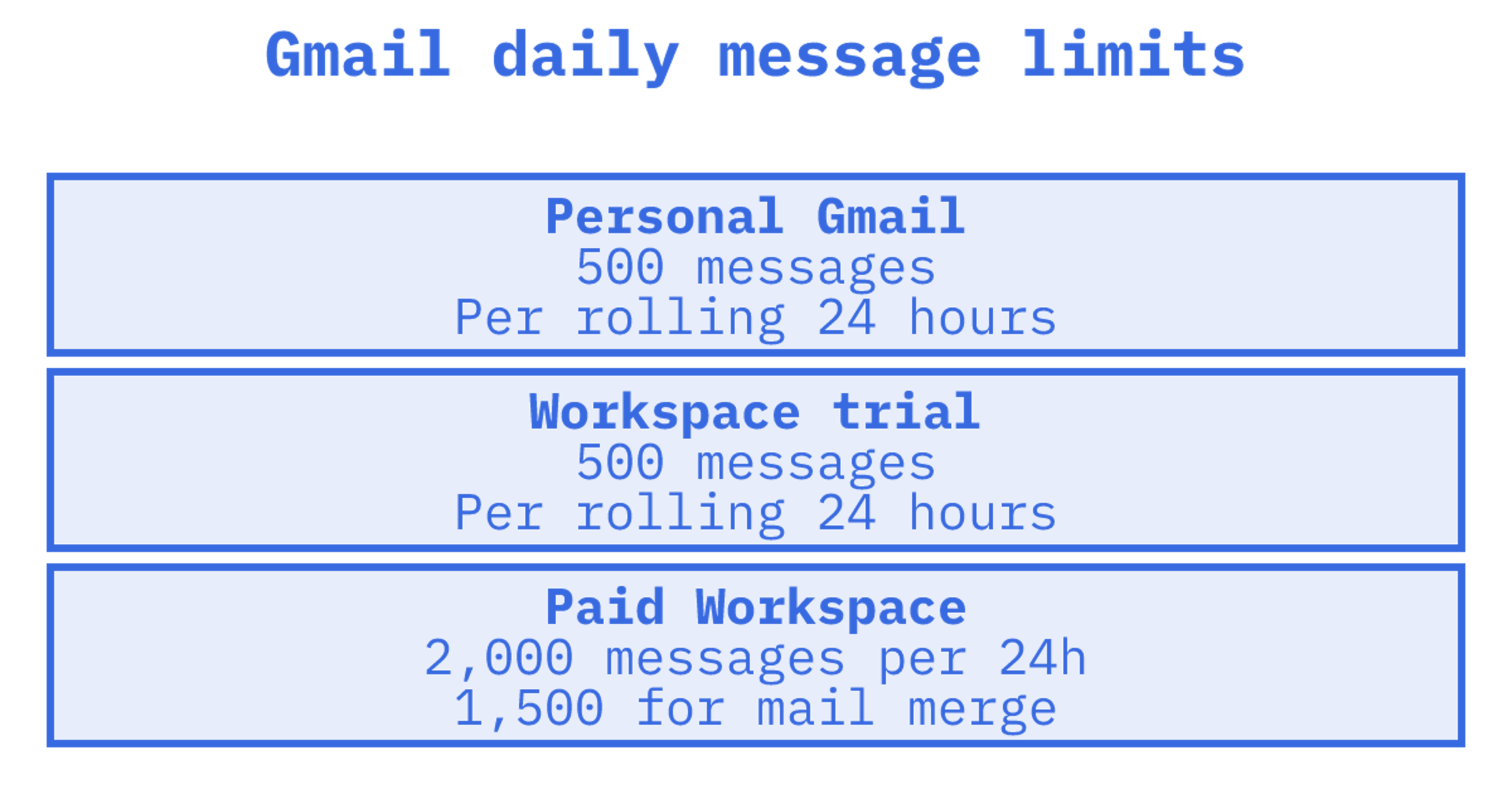
Gmail allows up to 500 messages a day from a personal account and up to 2,000 from a paid Google Workspace account, counted over a rolling 24-hour window. An agent fleet can use up that allowance on sends, retries and replies. Track each account’s quota and use eligible providers for the mail they’re authorised to send. Qubrics provides agent mailboxes through the Mailbox API and routes outbound mail through the Sending API. Connected providers include Gmail OAuth, Outlook and custom SMTP accounts. Managed Amazon SES is a separate sending option.
TL;DR
- Personal Gmail and Workspace trial accounts: 500 messages per day. Paid Workspace: 2,000 per day, 1,500 for mail merge.
- Google also caps recipients: 10,000 total, 3,000 external and 3,000 unique per day on Workspace.
- Above roughly 5,000 messages a day to personal Gmail addresses, you are a bulk sender and must meet Google's authentication and unsubscribe rules.
- Blocks can arrive before the numeric cap, driven by bounces, complaints and sudden spikes.
- For agents, budget sends per provider and keep an eligible backup route for confirmed quota errors.
Table of Contents
The 2026 limits at a glance
Google's Workspace admin help is the authority, and it warns that limits can change without notice. The figures it lists:
| Limit (per rolling 24 hours) | Personal Gmail | Paid Workspace | Workspace trial |
|---|---|---|---|
| Messages sent | 500 | 2,000 (1,500 mail merge) | 500 |
| Total recipients | not separately listed | 10,000 (1,500 mail merge) | not separately listed |
| External recipients | not separately listed | 3,000 | not separately listed |
| Unique recipients | not separately listed | 3,000 (2,000 external) | 500 external |
The personal-account figure of 500 messages is confirmed on Google's personal Gmail help page, which also says the 500 recipients per single email cap applies.
Messages, recipients and unique recipients are three different counters
Most summaries quote only the 2,000 figure. Google counts three things:
- Messages: each send is one, however many people it goes to.
- Total recipients: every address on every send. Five emails to ten people is 50 recipients.
- Unique recipients: each address once per day. Those same five emails to ten people count as 10.
YAMM's guide adds that vacation responders, aliases, delegates, add-ons and scripts all draw on the same account allowance, and that a Bcc copy to 500 people on a mail merge doubles the recipient count. For an agent, this matters because a retry loop or an auto-reply counts against the same pool as your campaign.
Limits by sending method
The daily limits are the same however you send. What differs is the per-message recipient cap: per Google's Workspace page, 2,000 in the Gmail interface (500 external), 500 through the Gmail API and 100 through SMTP by POP or IMAP clients. Google's developer documentation confirms the SMTP cap of 100 recipients per message and that the daily limit is shared across all clients using the account.
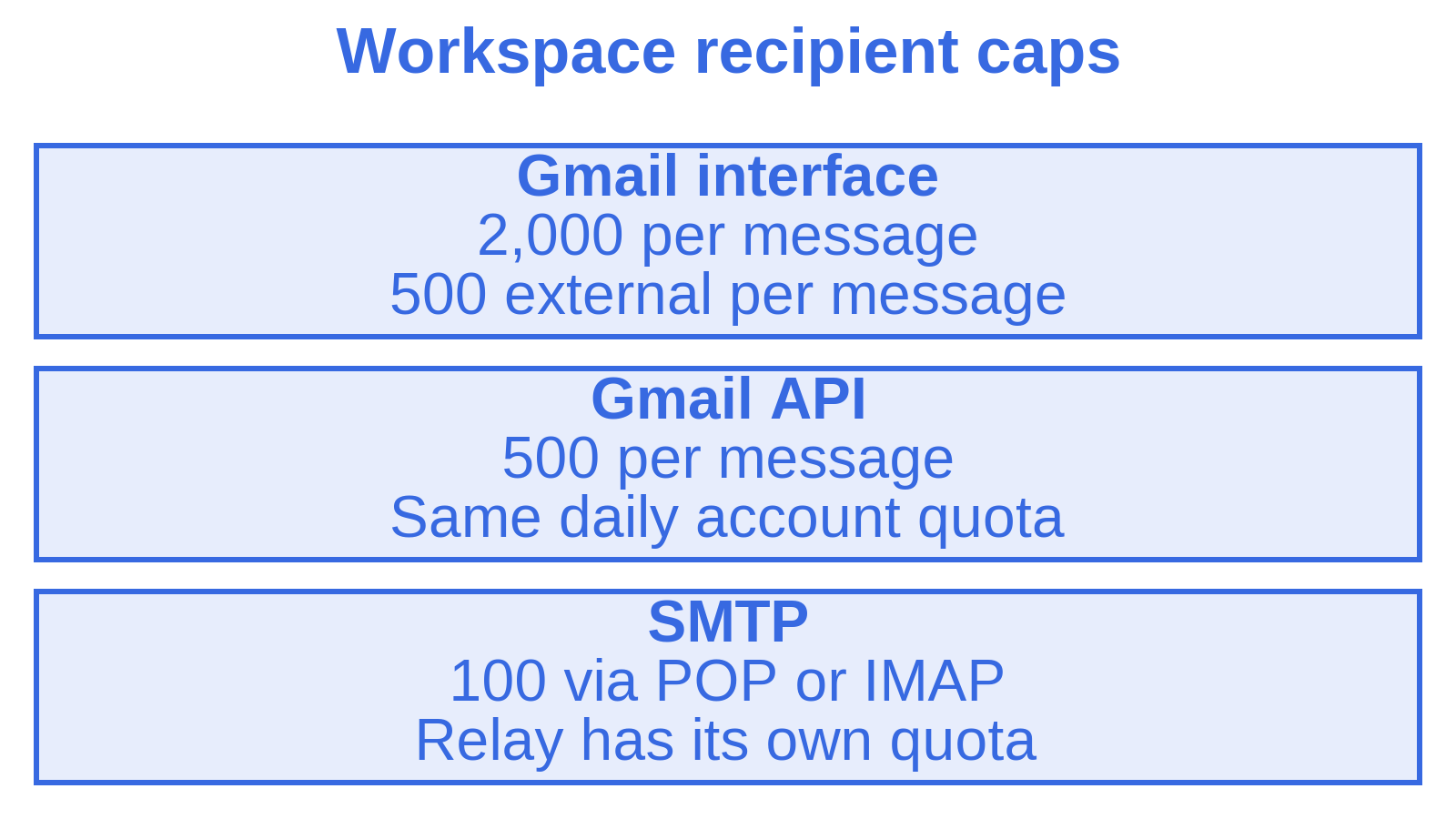
Google's SMTP relay service is separate, with its own counters. LaFactory's analysis notes a limit of 10,000 messages per user per 24 hours there, and 100 recipients per SMTP transaction. It does not consume the mailbox's own quota.
What happens when you hit the limit
Google's Workspace help says users see an error such as "You have reached a limit for sending email" and cannot send new messages for up to 24 hours, though they can still receive mail and use other Google services. On personal accounts, Google says you should be able to send again within 1 to 24 hours.
For an agent, the practical failure is quiet: replies stop, a support thread goes unanswered, and nothing in your logs says why until you read the error. For a confirmed quota error, queue the message or use another eligible route. Check the delivery state before you retry an uncertain send.
Why Gmail can block you before the cap
Gmail can block sending before you reach the published limits. Google's personal help documents a "Messages you sent couldn't be delivered" error when many sent emails bounce or go to invalid addresses, after which sending can be blocked for 24 hours. DeBounce's host-limits guide adds that high bounce rates, spam complaints and sudden volume spikes can trigger abuse controls even under the published cap.
Three habits keep an agent mailbox clear of this:
- Validate lists before high-volume sends, because hard bounces use up recipient slots and train filters against you.
- Ramp volume in steps instead of jumping from a handful to the full daily allowance.
- Use safe queues and send controls so batches are paced rather than fired at once.
Bulk sender rules: the 5,000 threshold
Separate from account caps, Google's sender guidelines FAQ define a bulk sender as anyone sending close to 5,000 messages or more to personal Gmail accounts in 24 hours, counted across the whole primary domain. Meet that once and you are treated as a bulk sender permanently. Workspace users are included when sending to personal Gmail addresses.
Per Google's email sender guidelines, bulk senders must:
- Set up SPF and DKIM and publish a DMARC record. A policy of p=none is accepted.
- Keep valid forward and reverse DNS and use TLS.
- Keep the Postmaster Tools spam rate below 0.30%.
- Align the From header with SPF or DKIM.
- Support one-click unsubscribe for marketing and subscribed mail.
The FAQ also says Gmail has been ramping up enforcement on non-compliant traffic since November 2025, with temporary and permanent rejections. It recommends staying under 0.1% spam rate, since delivery is already affected above that level. If you run many sender domains, our SPF, DKIM and DMARC setup guide walks through the records, and the domain verification guide covers confirming each domain.
For wider context on compliance for teams sending at volume, this marketing automation checklist is a useful companion.
Attachment size
Personal Gmail accounts can send attachments up to 25 MB. Gmail turns larger files into Google Drive links. Workspace administrators set limits for work and school accounts, and the Workspace page lists 25 MB for Business, Education and Enterprise Standard.
Designing agent email around the limits
A Gmail account gives an agent an address and a fixed sending allowance. Plan how the workflow will stay within that allowance.
- Give each agent or tenant its own mailbox, so one noisy workflow cannot burn another's allowance.
- Give each mailbox and sending account its own budget below Google's ceiling. Leave room for replies and retries.
- Route across eligible connected accounts with weights for Gmail OAuth, Outlook and custom SMTP. Treat managed Amazon SES as a separate route with its own limits.
- Plan for quota and rate errors. Use a second authorised provider only when it is eligible and you know the original send was rejected.
- Watch delivery logs and suppressions so bounces are removed before they cost you reputation.
If your Gmail OAuth tokens keep expiring or a mailbox has been suspended, the Gmail OAuth sending guide covers the five common errors.
Where Qubrics fits
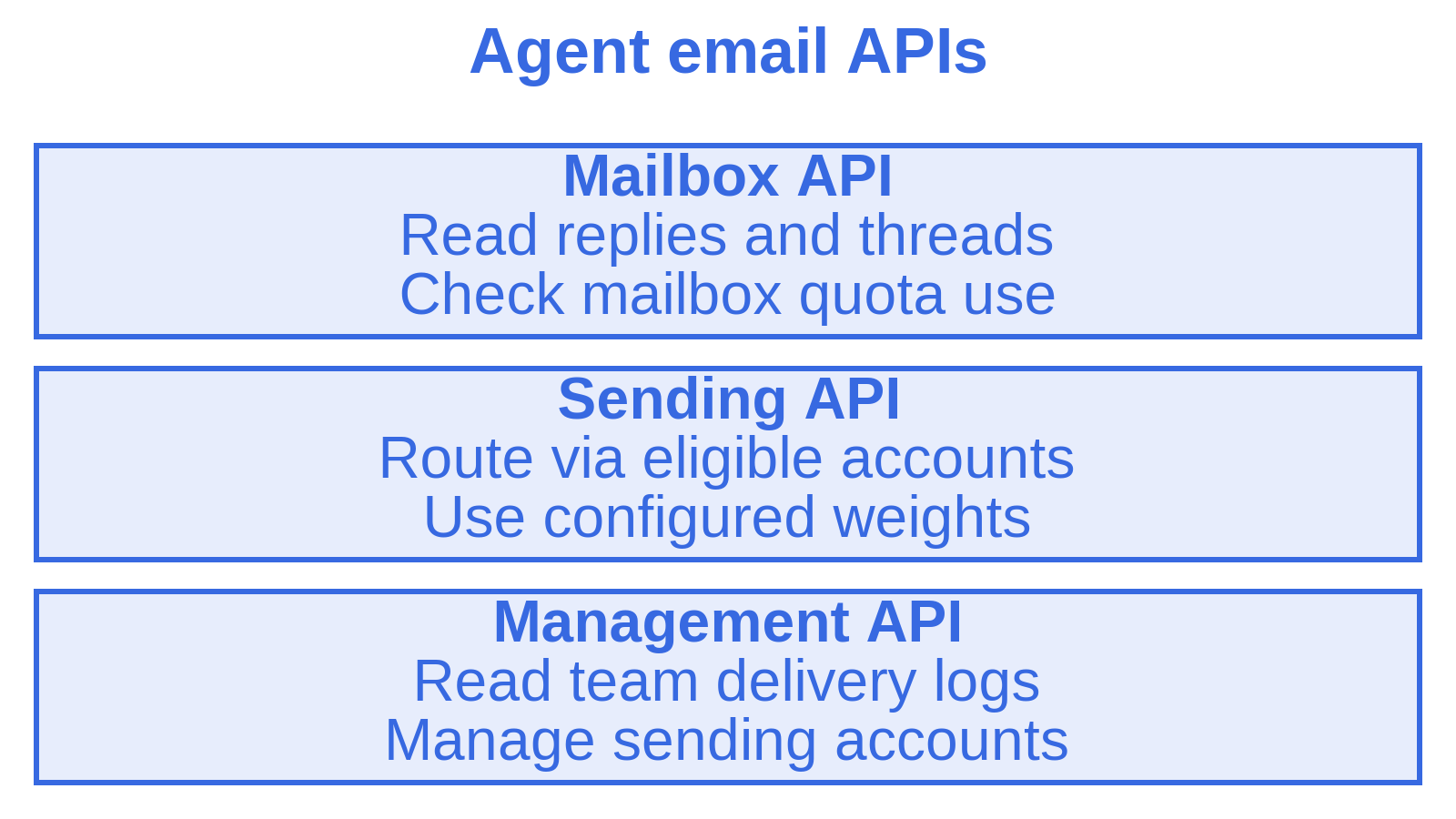
Qubrics can give each agent, customer or workspace its own mailbox within the team’s limits. Use @myagent.mx or a custom domain verified for sending and receiving. Read incoming messages, threads and mailbox quota usage through the Mailbox API. The Sending API routes outbound through configured Gmail OAuth, Outlook or custom SMTP accounts. You can set quotas on custom SMTP accounts and weight traffic across eligible connected providers. A delivery group uses only eligible members, so a backup has to be in the permitted group and have capacity. Managed Amazon SES has its own limits and sits outside delivery groups. The Management API reads team delivery logs. Our sending API with provider failover is where that lives, and inbound mailboxes cover the receiving side.
The Free plan has a base price of 0 USD per month per team and Pro is 7 USD per month per team. Usage charges draw from the team’s balance, including its starting credit on Free. Connected outbound is 0.000500 USD per provider-accepted recipient occurrence. Managed sending is 0.000750 USD per provider-accepted recipient occurrence. Inbound is 0.000500 USD per distinct mailbox delivery. Storage is 0.02 USD per decimal GB-month. Each mailbox counts toward the team’s capacity.
Our view: stop treating Gmail's cap as your cap
We see the 500 and 2,000 figures quoted as if they were a plan. They are Google's protection for a human inbox, and an agent that sends, retries and replies unattended will meet them sooner than its builder expects.
Plan for quota errors before the agent runs at 3 a.m. Give each agent its own mailbox within the team’s limits and budget for each provider. For a confirmed quota rejection, keep an eligible alternative ready. The Mailbox API gives agents access to stored mail and the Sending API routes mail through configured providers. Webhooks can notify your app when mail arrives.
Gmail can stay in that mix. An eligible second route gives you an option when that account reaches its quota.
Sources
Recommended
Frequently Asked Questions
How many emails can I send per day from Gmail in 2026?
Personal Gmail and Workspace trial accounts can send up to 500 messages a day, and paid Workspace accounts up to 2,000, over a rolling 24-hour period. Mail merge on Workspace is capped at 1,500 messages. Google says these limits can change, so check its help page.
Is the Gmail limit per email or per recipient?
Google counts messages, total recipients and unique recipients separately. An email to 200 people counts as one message and 200 recipients. The first counter you exhaust determines when you hit a limit.
How long until I can send again after hitting the limit?
Google says sending is blocked for up to 24 hours, and on personal accounts typically resumes within 1 to 24 hours. You can still receive mail during that time.
Do the limits change if I send through the Gmail API or SMTP?
The daily limits are shared across sending methods. Per-message Workspace limits differ. The Gmail API allows 500 recipients per message and SMTP through POP or IMAP clients allows 100. Google’s separate SMTP relay service has its own counters.
