Vercel AI Email: Give Your Agent a Real Inbox

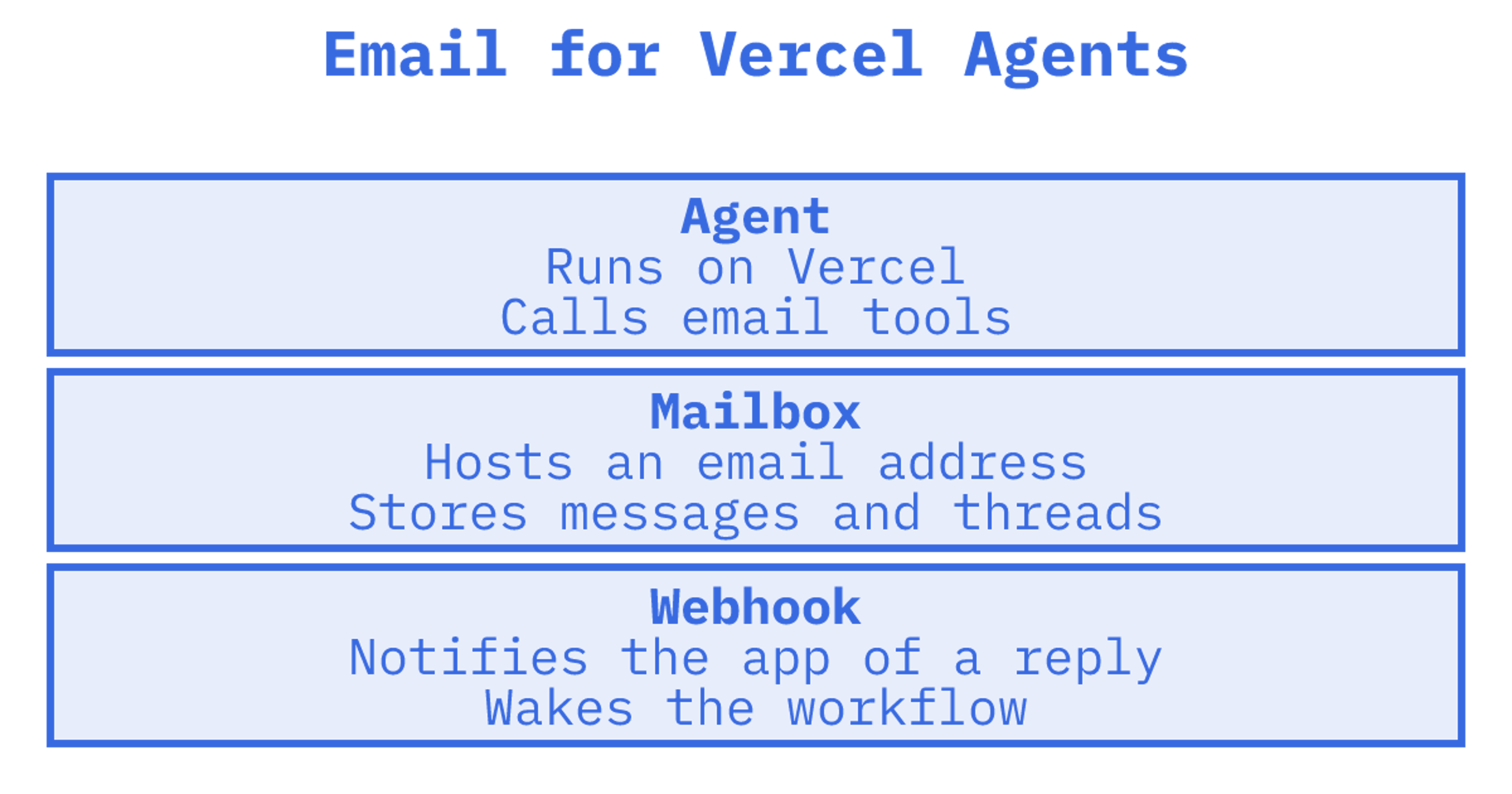
Your Vercel AI SDK agent asks a customer for an order number. Where will it read the reply? Vercel doesn't host email, so give each agent or tenant a mailbox that lives outside the app. Qubrics provides mailboxes that store incoming messages. Use the Mailbox API to read them and the Sending API for outbound mail through connected providers.
Choose the tools the agent needs and keep each tenant's mail separate. Set up a webhook to wake the workflow when a reply arrives.
TL;DR
- Run the app on Vercel and use the AI SDK for model calls and tools. Host the inbox with a separate mail service.
- A send-only API can handle the first email. Give the agent a persistent mailbox if it needs to read replies and return to the same thread.
- Give the model a small set of tools with typed inputs. When a reply arrives, have a webhook wake the durable workflow.
- Before launch, verify SPF, DKIM and DMARC. Decide how to enforce quotas and keep one tenant's mail separate from another's.
- Qubrics mailboxes can use @myagent.mx or a custom domain verified for sending and receiving. Read messages through the Mailbox API. The CLI can register an agent inbox on @myagent.mx.
Table of Contents
1. What "Vercel AI email" actually means
Search for "vercel ai email" and you may find the Vercel sign-in page or the open-source vercel-labs email-agent example. If you're giving an agent built with the Vercel AI SDK its own email address, start with the inbox.
A customer might reply in four seconds. Or four days. Vercel's workflow tooling can pause a job until the reply arrives, while the mailbox holds the thread the agent will read when the job resumes. Use the AI SDK for model calls and tool use.
Pick the inbox that will receive replies. Then decide how a new message will notify the app.
2. Does Vercel offer email hosting?
Use your email provider's MX records if Vercel DNS manages the domain. Add the SPF and DKIM TXT records the provider gives you too. See the Vercel DNS setup guide for where to enter them.
That has two consequences for an agent project:
- You can deploy your app on Vercel and choose a separate mail provider that supports the inbox your agent needs.
- Check DNS first when mail goes missing. A wrong MX record can send a reply to the wrong server. Without the DKIM record, a recipient's mail server may be unable to verify the signature.
When mail gets delayed or rejected, see which email deliverability issues to fix first. For the DNS records, see the SPF, DKIM and DMARC setup guide and domain verification walkthrough.
3. Three ways to give a Vercel agent email, and where each stops
Most teams try them in this order.
| Approach | What you get | Where it stops for an agent |
|---|---|---|
| Transactional send API | Reliable outbound, delivery events | No inbox. Replies need a separate inbound route, a parser and your own thread logic |
| Gmail or Outlook OAuth on a shared account | A real inbox quickly | Tokens expire in production, the account can be rate-limited or suspended, and every tenant needs its own consent flow |
| IMAP and SMTP scripts | Works with any mailbox | Polling loops, connection handling and credentials to store, in an environment where functions are short-lived |
| A mailbox API built for agents | Real addresses, send, receive, threads, routing and logs in one place | You choose a provider and design tenancy deliberately |
The first three options use general-purpose tools. The last uses a dedicated mailbox. A Qubrics mailbox stores messages. The Mailbox API covers messages, threads, folders, message keywords, attachments, sender identities, quotas, usage and submissions. The agent can return to the mailbox to read a stored thread.
Poll IMAP from a Vercel function and you can end up fetching and parsing the same messages each time. When a reply comes in, the function can look up its stored thread.
4. The architecture that works on Vercel
Keep three responsibilities separate.
The agent uses AI SDK tools to read and send mail. It decides what to say in a route handler or a workflow step.
The mailbox keeps its messages and threads outside your app deployment. It has its own address and quota.
The event path begins with a webhook to your route. Start or resume the workflow from that route so it can fetch the new message for the agent.
Keep the thread in the mailbox and let the workflow wait for the reply. If you redeploy before it arrives, the workflow can still fetch the stored thread and continue the conversation.
Outbound: one send endpoint with proper threading
Agents send through a single send endpoint. In the app's reply tool, put the parent email's Message-ID in in_reply_to and the chain of Message-IDs through that parent in references. Those fields correspond to the In-Reply-To and References headers, which help the recipient's mail app group the reply with the original conversation.
For a mailbox send, include a small attachment as base64 or pass a blob ID from an earlier upload. An uploaded reference keeps the file itself out of the model-facing payload.
Inbound: read the new reply, not the whole thread
A customer adds one line above ten older replies. That new line can get lost if the model reads the whole chain. The Qubrics Mailbox API can strip quoted history so the agent can read the new reply. The clean content endpoint can include HTML on request. Use the raw body endpoint when you need the original body for audit or forensics.
If the customer replies "yes, that address is right", fetch the part of the thread that shows which address they mean.
Retrieval that does not flood the context window
An agent that lists a whole inbox to find one message wastes tokens and time. The Mailbox API is designed for precise retrieval:
- GET /mailbox/messages filters on folder, thread, free-text q, sender and recipient fields, subject, body, header name or value, size range, keywords, date range, has-attachment and unread. Use the thread filter on its own.
- A count endpoint answers "how many" without returning rows.
- A search-snippets endpoint returns previews without pulling bodies.
- Batch get, update and delete move many messages in one call.
- Sync endpoints return state tokens, so the agent asks for typed changes to the mailbox, a folder or a query instead of re-listing everything.
- GET /mailbox/session reports supported capabilities, request limits and current state tokens. GET /mailbox/me returns the mailbox associated with the credential.
Give each AI SDK tool filters suited to its job. A tool that reads a known thread can take just the thread ID.
5. Designing the email tools for the AI SDK
The quality of an email agent is mostly the quality of its tool surface. A few rules we would follow on any Vercel project:
- Start with the tasks at hand. Give the agent tools to search messages, read a thread and send or reply. If the workflow tracks progress, let it update keywords or folders.
- Return snippets first. Give the agent a preview of each search result. It can fetch the body once it knows which message it needs.
- Record progress in the mailbox. Store labels such as "handled", "needs human" and "waiting on customer" as keywords or folders. The agent can find the thread's status again after a restart.
- Set rules for sending. Have the tool prepare sensitive mail as a draft for a person to approve. Use recipient and domain rules to define whom the agent can contact.
- Cap the loop. Limit steps per run and replies per thread so two auto-responders can't keep triggering each other.
Use REST for a Vercel app or the CLI to work with an agent inbox from a terminal. The MCP page for agent builders covers editor integrations. The Mailbox API documentation identifies an MCP tool for reading text-like inbound attachments.
6. Waiting for replies without polling
A poll that runs every thirty seconds still runs when the inbox is empty. It keeps using function time while you wait for a customer.
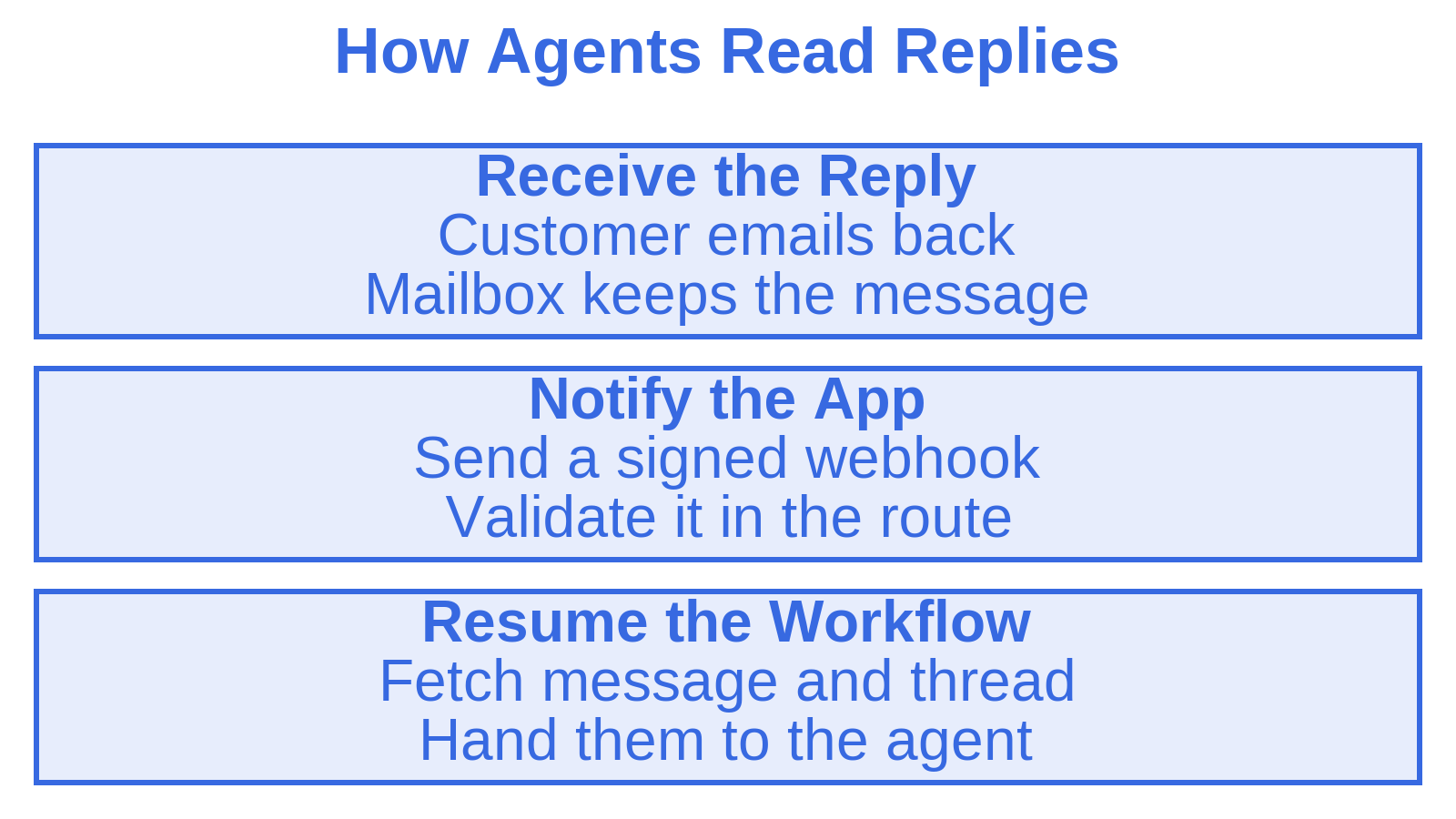
Qubrics can POST a signed webhook notification to your route when a mailbox receives a message. Validate the notification in the route and resume the waiting workflow. Have it fetch the new reply and pick up the thread.
Once your route is back up, use the sync endpoints and their state tokens to ask what changed since the last known state.
7. Multi-tenant agents: one mailbox per tenant
Two tenants share the Gmail account behind your app. If Gmail suspends it, both agents lose access to their mail. Give each tenant its own mailbox and scope the agent's access to that tenant.
With Qubrics, you can give each agent, customer, workspace or tenant a separate mailbox within your plan's limits. Give it an @myagent.mx address or use a custom domain verified for sending and receiving. The Mailbox API reports each mailbox's quota usage and submissions. The Management API can reconcile each mailbox's usage. For DNS and mailbox setup, see custom domain mailboxes for agents and teams.
Count the mailboxes you'll need before choosing a plan. Estimate what each tenant will send, receive and store, then check how the provider charges for the mailboxes and that usage.
8. What to check before launch
Before sending a customer email, test a misconfigured domain, a provider that hits its limit and an out-of-office reply.
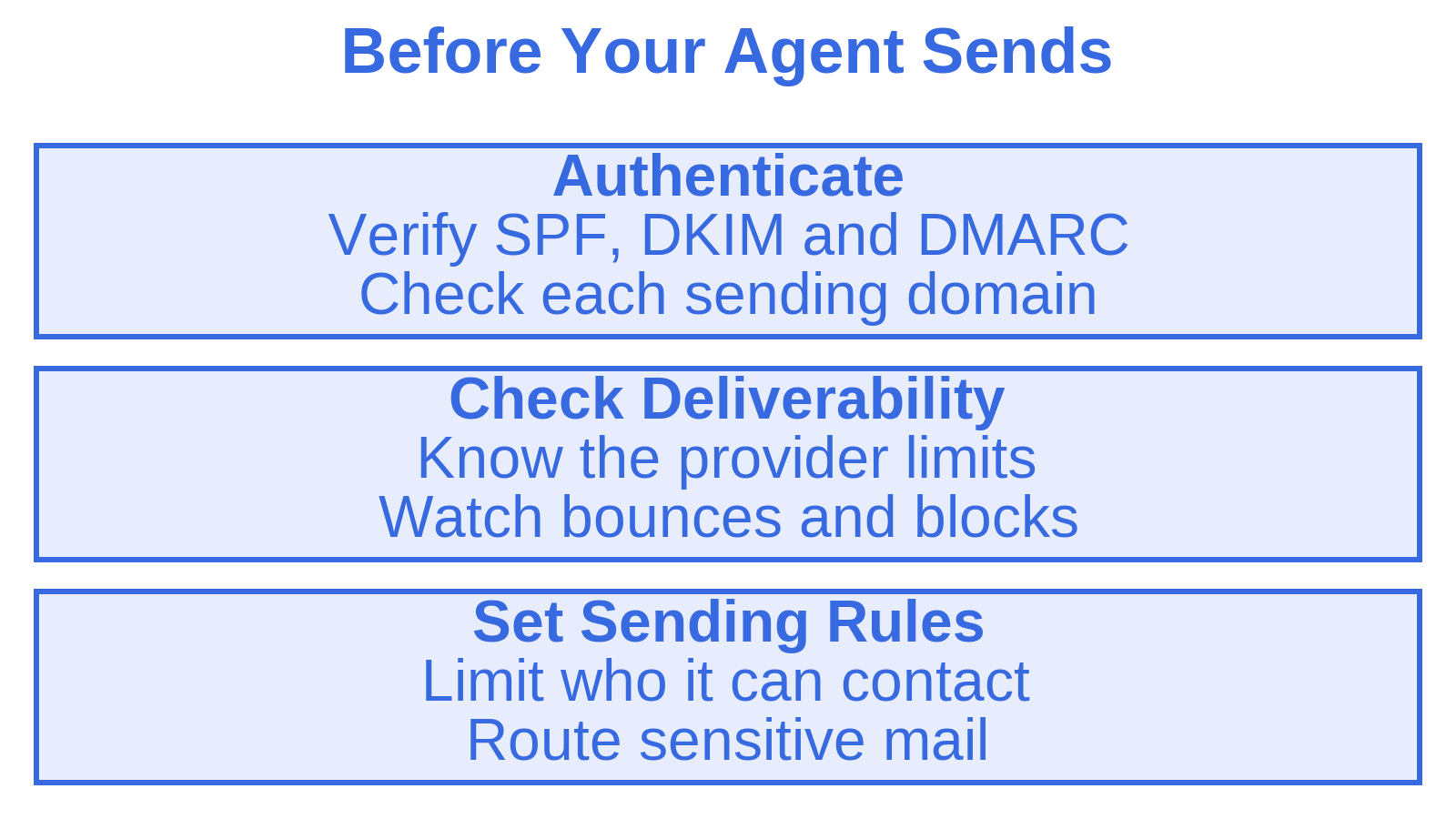
Authentication. Check SPF, DKIM and DMARC for every sending domain. If you manage several domains, verify those records when each one joins. For DMARC alignment, see the return path domain guide. An agent can register an inbox on Qubrics's included @myagent.mx domain without setting up its own DNS. The owner still has to accept the invitation and approve sending.
Deliverability. Increase sending gradually on a new domain. Stay within your quotas and track bounces and suppressions. If you have the delayed message, compare its Received header timestamps with the email header analyzer.
Rate limits and failover. Find your provider's limits and set the conditions for retrying a send. The Qubrics Sending API can send through configured providers, including custom SMTP accounts, or through managed Amazon SES.
Security. Give each agent the tools it needs for its job. Read tools are enough for a research agent. Store API keys in environment variables, limit each credential to its tenant or environment and log mailbox access.
Loop and abuse control. Look for auto-replies and out-of-office messages before sending. Limit replies per thread. Decide which addresses the agent can contact, especially if it collects them from the web.
Human handoff. Tag complaints, legal threats and questions about money. Send those threads to a person for review.
9. What it costs
The Qubrics Management API reports incoming mail, outgoing mail and storage costs for a mailbox. Connected outbound uses a provider you configure. Managed sending uses the managed Amazon SES account. Check the pricing page for current plan and usage rates in US dollars before you budget.
10. A worked example: a support agent on Vercel
A customer emails a small SaaS business to ask when their order will arrive. Here's how the support agent handles it.
- Create a mailbox, such as support on a custom domain verified for sending and receiving. You can use an @myagent.mx address while prototyping.
- A webhook event fires when a customer emails in. Your route validates it and starts a workflow.
- The workflow fetches the cleaned message and its thread, using filters so only that conversation is returned.
- The agent classifies the request, checks the relevant help content and writes a draft.
- Tag billing questions and complaints "needs human" and hand them off. For other requests, the workflow passes
in_reply_toandreferencesto the app's reply tool so it can build the threading headers.
- Have the workflow wait for the next event in the thread. If the timer fires first, it can start a follow-up.
Test a redeploy during the wait. Send the first support reply, redeploy the app and answer as the customer. Check that the workflow resumes with the original thread. When the second tenant joins, verify that its agent cannot fetch the first tenant's thread.
Perspective: why we think the mailbox is the right unit
We talk to a lot of teams building agents, and the pattern is consistent. They start with a send API because it takes an afternoon. Then the first customer replies, and they discover they have built half an email system: a parser, a webhook relay, a thread store, a Gmail token refresher. Each piece works. Together they are a second product that nobody wanted to build.
Our view is that an agent's email identity should be a first-class resource, the same way a database is. Give it an address, persistent mailbox state and scoped access. In Qubrics, the Mailbox API reads messages, threads, quota usage and submissions. The Sending API handles outbound mail through configured providers.
We also think the economics should follow the work. If every tenant needs an inbox, pricing per inbox punishes exactly the architecture that is safest. Usage-based billing keeps the incentive aligned with good design.
The longer-term direction is a context layer that turns a company's mail into accurate, permissioned context its agents can act on. Getting the mailbox right today is the foundation for that.
Start with a free mailbox
Try the setup with one support thread. If you have a Vercel agent and no inbox for it, create a mailbox and connect one tool. The Free plan includes mailbox capacity for new teams. Use REST or the agent CLI to access a mailbox on the Qubrics platform. See the sending API with provider failover and inbound mailboxes pages for outbound and inbound setup.
Sources
Recommended
Frequently Asked Questions
Does Vercel have a built-in email service for AI agents?
Vercel runs the app. Give the agent an address with an email service, keep its conversations there and limit its access to that mailbox. Your app can read its stored messages with the Qubrics Mailbox API.
Can an agent on Vercel receive and reply to email?
Yes. A customer can reply with an order number and wake the workflow. Qubrics can POST a signed webhook notification to your route when a mailbox receives a message. Have the workflow read the new message and its thread first. The In-Reply-To and References headers help the recipient's mail app group the agent's reply with that conversation.
Why not use my own Gmail account with OAuth?
You can get a test inbox working quickly with Gmail and OAuth. Tokens can expire, and if several tenants share a Gmail account, any rate limit or suspension can affect all of them. Give each tenant its own Qubrics mailbox on @myagent.mx or a custom domain verified for sending and receiving. Check the mailbox's quota usage and submissions in the Mailbox API.
Do I need a separate inbound parser?
Start with the Qubrics Mailbox API's clean content endpoint. It can strip quoted history and leave the agent with the latest reply. Request HTML to keep the formatting. Use the raw body endpoint when you need the original body.
What does Qubrics cost to try?
New teams on the Free plan have mailbox capacity. If you're budgeting for one inbox per tenant, check the [pricing page](https://sendmux.ai/pricing) for current plan and usage rates in US dollars.
